Ops: Automate Server Provisioning in 3 Phases, or Use Instant VPS

Ops: Automate Server Provisioning in 3 Phases, or Use Instant VPS
The best way to automate server provisioning is to build an IaC-first, zero-touch pipeline organized around three phases. Day 0 sets policy and blueprints, Day 1 handles discovery and unattended OS deployment, and Day 2 runs ongoing changes through triggers and workorders. Expect to combine several tools, not one, and to change how your team reviews and ships infrastructure changes.
TL;DR:
- Most failures in automation stem from organizational issues like unclear approval processes and insecure secret management, not technical flaws.
- Fully automating server provisioning requires careful planning of Day 0 policy setting, Day 1 discovery and deployment, and Day 2 management, with skipping Day 0 risking inconsistency.
- Infrastructure as code works for both cloud and bare-metal environments, but combining resource provisioning tools like Terraform with configuration tools like Ansible yields reliable results.
- Running a successful pilot should focus on a single server role, use CI/CD gates for changes, and expand gradually over a few weeks to avoid project stalls.
- Managed VPS solutions like AceRDP offer instant, secure servers for testing and development, ideal when full automation investment isn’t justified by scale.
Table of Contents
- What Automated Server Provisioning Actually Means
- What Happens in the Day 0, Day 1, and Day 2 Phases?
- Which Tools Handle Provisioning vs. Configuration?
- How Do You Run a Provisioning Automation Pilot?
- What Goes Wrong When Teams Automate Provisioning?
- AceRDP’s Take: Managed VPS or Full Zero-Touch Automation?
- How Do You Keep Automated Provisioning Secure and Compliant?
- How Does Provisioning Automation Fit Into CI/CD Pipelines?
- Our Take on What Actually Moves the Needle
- Get a Ryzen 9 9950X VPS Running in Minutes
- Sources
- FAQ
What Automated Server Provisioning Actually Means
Server provisioning is the work of preparing hardware, physical or virtual, so it’s ready to run a workload: installing an operating system, configuring networking and storage, and deploying the application stack on top. Red Hat defines automated provisioning as using infrastructure as code (IaC) to execute those same steps repeatably, without a human clicking through a wizard each time.
That distinction matters because manual provisioning doesn’t scale linearly. A skilled admin can build one server carefully. Building the fiftieth one identically, at 2 a.m., without drift, is a different problem entirely, and it’s the one automation actually solves.
Codifying infrastructure as files, rather than as tribal knowledge in someone’s head, delivers a few concrete payoffs:
- Consistency: every server built from the same template gets the same patches, firewall rules, and baseline packages.
- Speed: a provisioning job that took an afternoon can run in minutes once scripted.
- Fewer errors: typos and forgotten steps disappear when a machine executes the checklist.
- Repeatability: you can rebuild a compromised or failed server exactly, instead of reverse-engineering what made it work.
This IaC-first approach applies whether you’re standing up cloud instances, virtual machines on your own hypervisors, or bare-metal racks in a colo. The mechanics differ, but the discipline of “describe it in code, then apply the code” stays constant. Infrastructure as code also frees staff for higher-value work instead of repetitive manual builds, which is usually the argument that gets budget approved.
What Happens in the Day 0, Day 1, and Day 2 Phases?
Zero-touch provisioning breaks the server lifecycle into three named phases, a framework popularized by bare-metal automation platforms like RackN’s Digital Rebar. Each phase has a distinct job, and confusing them is one of the more common planning mistakes teams make.
- Day 0: define policy before you touch hardware. This is where you write classification rules (how a machine’s role gets determined), build blueprints and hardware profiles, and document naming conventions, network segments, and security baselines. Nothing gets deployed yet; you’re deciding what “correct” looks like.
- Day 1: discover and build. Automated discovery, often through PXE boot into a minimal Linux environment (similar in concept to the Sledgehammer discovery image used in some rack-scale tools), identifies hardware over the network before an OS is even installed. From there, firmware and BIOS settings get automated via IPMI or Redfish, the OS gets laid down through kickstart files or cloud-init, and initial application bootstrap runs.
- Day 2: operate and evolve. Ongoing management runs through workorders, triggers, and blueprints: a trigger fires on an event (new CVE, scheduled patch window), a workorder executes the change, and a blueprint defines what the end state should look like. This is also where monitoring hooks and scheduled maintenance jobs live.
Pro Tip: Don’t skip Day 0 to get to the “real” automation faster. Teams that jump straight to scripting Day 1 tasks without agreed classification rules end up with inconsistent servers that automation just builds faster, not better.
PXE, IPMI/Redfish, and cloud image pipelines are the connective tissue across all three phases. Get comfortable with whichever your hardware vendor or cloud provider actually supports before you commit to a tool.
Which Tools Handle Provisioning vs. Configuration?
Provisioning automation tends to split cleanly into two jobs: standing up the resource (a VM, a cloud instance, a bare-metal node) and configuring what runs on it afterward. Conflating the two into one tool is where a lot of homegrown automation gets messy.
Resource provisioning is the domain of Terraform, OpenTofu, or Pulumi. Terraform and its open-source fork OpenTofu use a declarative configuration language to define what infrastructure should exist. Pulumi takes a different approach, letting you write the same logic in general-purpose languages like Python or TypeScript, plus an Automation API for embedding provisioning directly into your own applications. Choose Pulumi when your team already thinks in code and wants programmatic control; choose Terraform or OpenTofu when a large ecosystem of existing modules and provider plugins matters more.
Configuration management is Ansible’s job, along with tools like Puppet or Chef, applied after the resource exists. A common field pattern pairs Terraform or OpenTofu for the lifecycle of the resource with Ansible playbooks for post-boot setup, using cloud-init or a baked image for the initial handoff.
For bare metal specifically, boot automation depends on PXE infrastructure and discovery workflows, since there’s no cloud API to call. YAML shows up constantly here too, as the format underneath cloud-init, Ansible playbooks, and most provisioning templates, so understanding its structure pays off across every tool in the stack.
Orchestration patterns worth building toward:
- GitOps: infrastructure changes ship through pull requests, reviewed and merged like application code.
- Self-service portals: internal catalogs that let developers request a preconfigured server without filing a ticket.
- Automation APIs: programmatic hooks (like Pulumi’s) that let other systems trigger provisioning directly.
If your actual need is “give me a Windows or Linux server running in minutes,” building a zero-touch bare-metal pipeline is overkill. A managed VPS provider with instant provisioning already solved that problem for you.
How Do You Run a Provisioning Automation Pilot?
Start small, prove the pattern, then scale it. Trying to automate an entire fleet on the first attempt is how projects stall for a year.
- Define scope and end state. Pick one server role (a web tier, a database replica) and document the Day 0 deliverables: classification rules, a blueprint, and the security baseline it must meet.
- Prototype the build. Combine a base image, an IaC definition for the resource, and an Ansible playbook for configuration. Run it against two or three test nodes, not production.
- Add CI/CD gating. Require a plan or dry-run output on every pull request, a human review before merge, and automated tests that check the result matches the blueprint.
- Scale deliberately. Layer in classification rules for additional roles, pre-prime rack objects with IPMI or Redfish scans ahead of hardware delivery, and batch PXE boots once the single-node path is solid.
- Set a realistic timeline. A single-role pilot typically runs a few weeks. Gartner’s guidance favors small pilots with incremental scope increases over attempting rack-scale automation in one project, and that pacing holds up in practice.
Statistic Callout: Gartner’s research on infrastructure automation notes that client organizations pursuing full life-cycle automation typically integrate eight or more specialized tools rather than relying on a single platform. Budget your pilot’s tool count accordingly.
What Goes Wrong When Teams Automate Provisioning?
Most provisioning automation failures aren’t technical. They’re organizational: nobody defined who approves a change, secrets end up hardcoded in a script, or the rollback plan doesn’t exist until something breaks at 3 a.m.
Gartner’s own guidance is blunt about this: full life-cycle automation is a multi-year effort that requires treating infrastructure like software, with version control, code review, and continuous integration, not a weekend scripting project. Red Hat’s guidance on adopting automation as code makes a similar point: eliminate human-judgment steps deliberately before chasing full automation, or you’ll just automate the inconsistency.
Practical guardrails that prevent the common failures:
- Require pull request review for infrastructure changes, the same as application code.
- Store secrets in a dedicated vault, never in plaintext variables or committed files.
- Apply role-based access control so provisioning credentials aren’t shared broadly.
- Sign and verify images before they’re deployed to catch tampering.
- Build rollback into the pipeline from day one, not after the first bad deploy.
Pro Tip: Treat your provisioning scripts and playbooks with the same testing discipline as production application code. A broken Ansible playbook that runs unattended at 2 a.m. against fifty servers is a much worse night than a broken deploy script that fails on one.
BMC hardening and firmware update discipline matter just as much as the software layer, especially for bare metal, since a compromised management interface can undo every other control you’ve built.
AceRDP’s Take: Managed VPS or Full Zero-Touch Automation?
Not every team needs a bare-metal zero-touch pipeline, and pretending otherwise wastes engineering time. Managed VPS provisioning and full zero-touch automation solve different problems, and picking the wrong one for your situation is its own kind of failure mode.
A managed instant VPS platform hands you a running server, already provisioned, in minutes, with no PXE infrastructure or discovery workflow to build. Zero-touch bare-metal automation gives you full control over hardware, firmware, and rack-scale deployment, at the cost of months of engineering work before it pays off.
AceRDP fits the managed side of that split well. Its Windows RDP and KVM VPS plans run on Ryzen 9 9950X class AMD hardware with NVMe storage, deliver full administrator access on Windows Server or Linux instances, and provision in minutes across Netherlands and US locations with DDoS protection included.
- Choose managed instant VPS (AceRDP or similar providers) when you need a server running today, want full admin control without owning the hardware lifecycle, or your workload doesn’t justify a custom automation stack.
- Choose a full zero-touch bare-metal build when you’re managing dozens or hundreds of physical nodes and the automation investment pays for itself in reduced labor.
- Established competitors in the enterprise VPS space sometimes offer more granular network customization, but usually at a higher price point for comparable specs.
For development, remote desktop, and automation workloads specifically, the instant provisioning path usually beats building custom zero-touch tooling from scratch.
How Do You Keep Automated Provisioning Secure and Compliant?
Automation doesn’t remove security risk, it relocates it. A script with excessive privileges can misconfigure fifty servers as fast as it can correctly configure them, so the controls that mattered in manual provisioning matter more once you’re moving at automation speed.
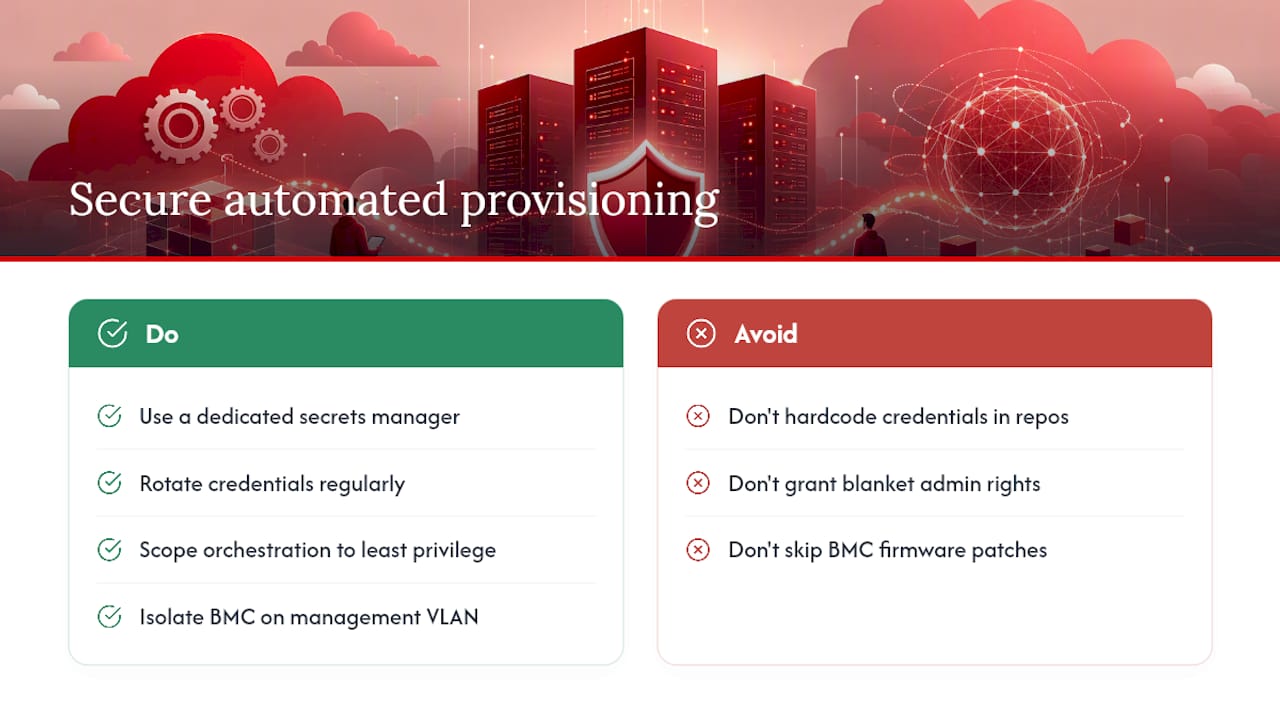
Secrets management is the most common failure point. Provisioning scripts often need credentials for cloud APIs, BMC access, or configuration management servers, and hardcoding them into a repository is still one of the most frequent real-world security incidents. Use a dedicated secrets manager, rotate credentials regularly, and never let a provisioning tool run with broader permissions than the specific task requires.
Least-privilege access control applies to the orchestration layer itself. The system that triggers your Day 2 workorders shouldn’t have blanket administrative rights across your entire environment; scope its permissions to exactly the resources it touches.
For bare metal, BMC (baseboard management controller) hardening deserves specific attention. IPMI and Redfish interfaces used for discovery and firmware automation are powerful enough that a compromised BMC can bypass OS-level controls entirely. Change default credentials, isolate BMC network traffic on a dedicated management VLAN, and keep firmware patched on the same cadence as your OS.
Compliance frameworks that govern your industry, whether that’s SOC 2, HIPAA, or a sector-specific standard, generally expect documented, auditable change processes. A GitOps workflow with pull request history and CI logs happens to satisfy that requirement almost automatically, which is a practical reason to adopt it beyond the engineering benefits.
How Does Provisioning Automation Fit Into CI/CD Pipelines?
Provisioning and CI/CD used to be separate concerns: developers shipped application code through a pipeline, and infrastructure got built by a different team on a different timeline. That separation breaks down once infrastructure is defined as code, because code belongs in the same pipeline discipline as everything else.
The practical pattern is plan and apply gating. A pull request that modifies a Terraform or OpenTofu configuration triggers an automated plan showing exactly what would change, before anything actually happens. A human reviews that plan, the same way they’d review application code, and only a merge triggers the apply step that makes the change real.
Automated tests belong in this pipeline too. Beyond syntax validation, tests can confirm a provisioned server matches its blueprint: correct packages installed, expected ports open, firmware at the right version. Catching a misconfigured template in CI is dramatically cheaper than catching it after fifty servers have already built from it.
This integration also closes the loop between Day 1 and Day 2. A Day 2 trigger, say, a scheduled patch cycle, can run through the exact same CI/CD gate as a brand-new Day 1 build, which means your review process doesn’t have two different standards depending on whether a server is new or existing.
Our Take on What Actually Moves the Needle
Most provisioning guides treat tooling as the hard part. It isn’t. The mechanics of Terraform, Ansible, or PXE boot are well documented and learnable in a week. What actually determines whether automation sticks is whether your team agreed on Day 0 policy before writing a single script.
We’d push back on the instinct to chase a single unified platform that handles everything. It doesn’t exist, and chasing it usually delays a working pilot by months. A resource provisioner, a config manager, and a CI gate covering three servers well beats an all-in-one platform covering nothing yet.
The other overlooked point: not every team needs to build zero-touch bare-metal automation at all. If your actual requirement is a Windows or Linux server running reliably within minutes, an instant-provisioning VPS solves that today, and building custom PXE infrastructure to replace it would be solving a problem you don’t have. Match the investment to the scale you’re actually operating at, not the scale you might reach someday.
— AceRDP
Get a Ryzen 9 9950X VPS Running in Minutes
AceRDP skips the zero-touch build entirely for readers who just need a fast, reliable server today. Every plan runs on Ryzen 9 9950X class AMD hardware with NVMe storage, full administrator access on Windows Server or Linux, and instant provisioning from data centers in the Netherlands and the US.

DDoS protection is included on every plan, and payment works with either credit card or crypto, no long-term contract required to test whether a given plan fits your workload. If you’re piloting the Day 0/1/2 approach covered above but need a base image or a test environment to validate playbooks against right now, spinning up a VPS is faster than provisioning your own bare metal for a proof of concept. Check available AceRDP plans and deploy a test instance to see provisioning speed and Ryzen performance firsthand.
Sources
- What is provisioning? — Red Hat
- Zero Touch Operations — RackN docs
- How to Automate Server Provisioning and Configuration Management — Gartner
- Pulumi — Infrastructure as Code
FAQ
What Is Automated Provisioning?
Automated provisioning uses infrastructure as code to install operating systems, configure networking and storage, and deploy applications without manual, step-by-step setup, producing the same result every time it runs.
What Is Server Provisioning?
Server provisioning is the overall process of preparing a physical or virtual server for use: installing the OS, configuring network and storage settings, and deploying the application software it will run.
How Do You Automate User Provisioning on Servers?
User provisioning gets automated through configuration management tools like Ansible, which apply user account creation, permissions, and access policies as part of the same playbook that configures the rest of the server, keeping accounts consistent across every machine built from the same template.
How Do You Set Up a Provisioning Server?
A provisioning server typically combines a PXE boot service for network installs, a repository of OS images or kickstart/cloud-init files, and an IaC tool that defines the target state; for bare metal, IPMI or Redfish access to hardware is added for discovery and firmware automation. Teams that don’t need that level of control can skip the build entirely with a managed instant-provisioning VPS instead.


