3 Best VPS Providers for 2026: Windows RDP, Value, and Managed Support

3 Best VPS Providers for 2026: Windows RDP, Value, and Managed Support
For most buyers, the best VPS provider in 2026 comes down to three names: AceRDP for Windows RDP and CPU-heavy workloads on NVMe storage, Hostinger for overall value, and Liquid Web for hands-off managed enterprise support. Budget shoppers should look at quicksrv.io or ARPHost instead, though you’ll trade some performance headroom for the lower price. A full comparison table and a buyer’s checklist follow below.
TL;DR:
- AceRDP excels in CPU-heavy workloads and Windows RDP, offering instant provisioning, NVMe storage, and full administrator access in US and Netherlands locations.
- Hostinger provides the best value with low-cost plans that include NVMe storage and a wide network of data centers, ideal for cost-conscious users.
- Liquid Web is the top choice for managed enterprise support, with strong SLAs and proactive technical assistance aimed at minimizing downtime.
- Budget providers like quicksrv.io and ARPHost serve small projects, but their shared resources and lack of dedicated NVMe make them unsuitable for production workloads.
- Performance depends heavily on CPU type, storage speed, and data center location, so users should verify these factors before purchasing a VPS plan.
Table of Contents
- What Is the Best VPS Provider for Your Workload?
- How Do You Choose the Right VPS Provider?
- How Are VPS Providers Actually Benchmarked?
- Where AceRDP Fits in the VPS Market
- Get Started With AceRDP in Minutes
- Sources
- FAQ
What Is the Best VPS Provider for Your Workload?
A virtual private server sits between shared hosting and a dedicated machine. You get your own slice of CPU, RAM, and storage on a physical host, isolated from other tenants, without paying for an entire server you don’t need. That’s the trade TechRadar highlights as the moment to upgrade from shared hosting: once your site or app needs isolated resources, custom software stacks, or more consistent performance than a shared plan can guarantee.
The catch is that “best VPS provider” means different things depending on what you’re running. A developer spinning up test environments has different needs than a trader running automated scripts on a Windows desktop 24/7. A small business hosting a WooCommerce store needs something else entirely. That’s why the strongest shortlists organize by use case rather than a single ranked list, an approach TechRadar’s own reviews lean on heavily.
Here’s how the leading options stack up when you sort them by what they’re actually good at.
Top picks by use case
- Best for Windows RDP and CPU performance: AceRDP, running AMD Ryzen processors with NVMe storage and full administrator access.
- Best overall value: Hostinger, which shows up in nearly every editorial roundup for its price-to-performance ratio and wide server locations.
- Best managed VPS: Liquid Web, known for support SLAs and hands-on enterprise account management.
- Best for WordPress and e-commerce: ScalaHosting, with a managed feature set built around web applications.
- Best unmanaged VPS for developers: Kamatera, thanks to granular configuration options and pay-as-you-go billing.
- Best for cloud-native scaling: Genesis Public Cloud, built around elastic resource allocation.
- Best budget entry point: quicksrv.io, which regularly surfaces in low price-bucket rankings.
The comparison table
Where each provider actually earns its spot
AceRDP leads this list for a specific reason: it’s built around Windows RDP access on AMD Ryzen 9 9950X hardware, which matters if your workload is CPU-bound automation, trading bots, or remote desktop sessions that need consistent single-core performance. NVMe storage across its Netherlands and US locations keeps disk I/O from becoming the bottleneck, and provisioning is near-instant, so you’re not waiting on a support ticket to get a working server. Full administrator access means you’re not fighting a managed panel to install what you actually need.
Hostinger shows up on nearly every value-focused roundup, and for good reason. Its entry-level VPS plans undercut most competitors on price while still shipping NVMe storage on higher tiers, and its footprint of data center locations is wider than most budget hosts can match.
Liquid Web is the pick when you’d rather pay for peace of mind than manage patching yourself. Its managed VPS plans come with support SLAs that put a real person on the line quickly, which matters for businesses that can’t afford downtime debugging.
ScalaHosting built its reputation on managed WordPress and e-commerce hosting, with a control panel and caching stack tuned specifically for those workloads. If you’re running WooCommerce or a high-traffic WordPress install and don’t want to touch server configuration, this is a sensible route.
Cloudways takes a different approach: it layers a managed platform over major cloud infrastructure providers, so you get cloud-style scalability without needing to understand the underlying cloud console. That’s a real advantage for teams who want flexibility but not the learning curve.
Kamatera is the most configurable option here, letting you dial in CPU, RAM, and storage independently rather than picking from fixed bundles. That flexibility appeals to developers who know exactly what resources they need and don’t want to overpay for a bundled tier.
InMotion Hosting and GreenGeeks both compete on support quality and reliability rather than raw specs. GreenGeeks adds a green-energy angle that matters to some buyers, though it doesn’t change the underlying performance math.
The budget names, quicksrv.io, ARPHost, Alwyzon, TakeHost.Biz, 0ping.eu, OnetSolutions, and Evolution Host Ltd, serve a real purpose in the under-$8 bracket, but at that price point you’re generally getting shared oversold resources rather than dedicated NVMe throughput. They fit small personal projects, test environments, or a first VPS purchase, not production workloads that need consistent performance.
Genesis Public Cloud and Server Optima round out the mid-tier, offering more flexibility than the rock-bottom budget hosts without the enterprise price tag of Liquid Web or InMotion.
How Do You Choose the Right VPS Provider?
Start with one question: do you want to manage the server yourself, or pay someone else to do it? That single decision filters out half the market immediately.
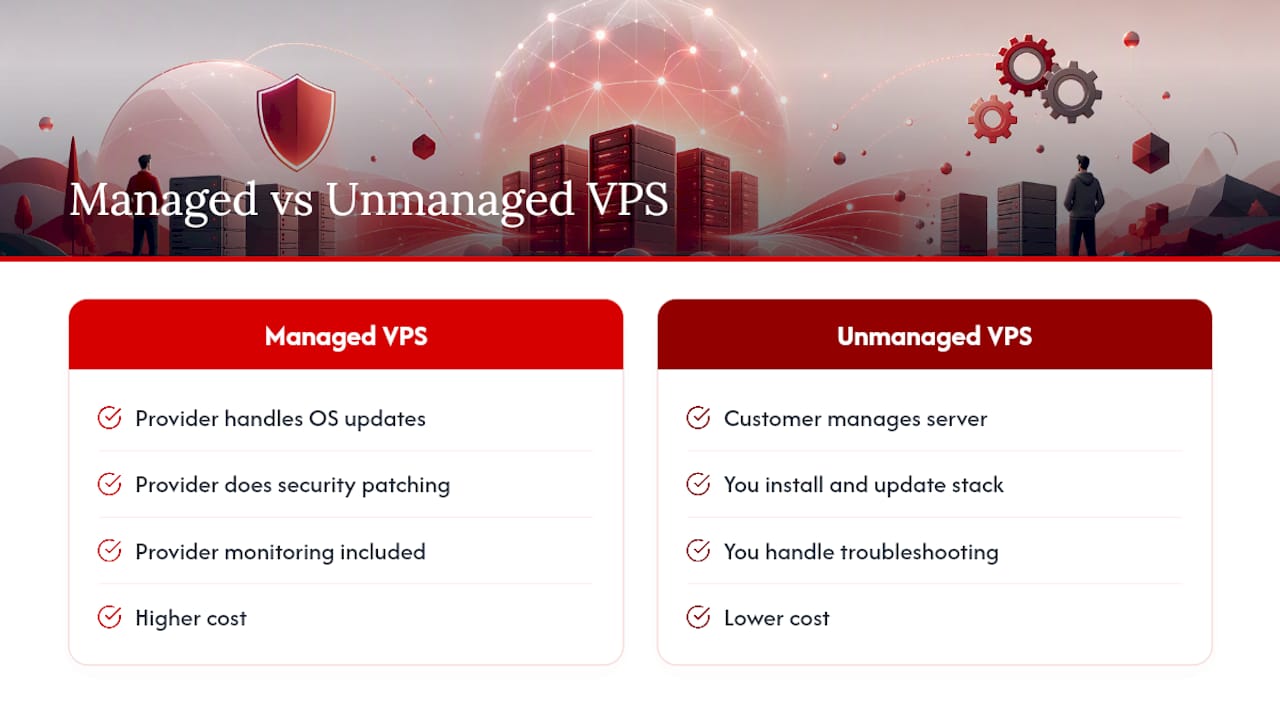
Managed VPS means the provider handles OS updates, security patching, and monitoring. TechRadar’s comparison of managed versus unmanaged hosting frames this as the primary fork in the road for buyers: managed costs more, but it removes the operational burden entirely. Pick managed if you don’t have the time or in-house skill to handle server administration, or if downtime from a missed patch would actually hurt your business.
Unmanaged VPS hands you full root or administrator access and nothing else. You install your own stack, manage your own updates, and handle your own troubleshooting. It costs less because you’re doing the work yourself. This is the right call if you’re a developer, a systems administrator, or someone running a specific workload (like remote desktop automation) that needs full control over the environment. AceRDP’s plans fall into this category. You get administrator access from the start, which matters if your workload needs custom software or nonstandard configurations that a managed panel would block.
Performance indicators worth testing before you buy
- CPU type and core allocation. Ask whether cores are dedicated or shared (vCPU oversubscription is common at the low end). AMD Ryzen and modern Intel chips generally outperform older Xeon generations on single-core tasks, which matters for RDP sessions and most automation scripts.
- Storage type. NVMe drives deliver dramatically faster read/write speeds than SATA SSDs, and SATA SSDs beat spinning disks by an even wider margin. If a provider doesn’t specify NVMe, assume SATA SSD or ask directly.
- Network latency and throughput. Location matters more than most buyers assume. A server in the wrong region can add 100+ milliseconds of latency for RDP sessions or database calls. Pick a data center close to your actual users or your own location if you’re the one connecting in.
Security and reliability checklist
Native DDoS protection and managed firewall tools aren’t optional extras anymore. TechRadar Pro’s guidance on managed VPS security treats these as baseline requirements, not premium add-ons, because a single sustained attack can take an unprotected server offline for hours. Before buying, confirm:
- Whether DDoS mitigation is included by default or costs extra
- How often automated backups run, and whether snapshots are included or billed separately
- What the actual SLA language guarantees, not just an advertised uptime percentage
Operational checklist before you commit
Provisioning speed varies wildly between providers. Some spin up a working server in under a minute; others queue your order for manual review. If you need a Windows Server image with RDP access, confirm it’s available at signup rather than requiring a separate request. Check accepted payment methods too. Providers that accept both credit card and cryptocurrency give you more flexibility, particularly if you’re paying from a business account that prefers not to expose card details to a hosting vendor.
Pro Tip: Before you commit to a monthly plan, ask support how long a full server rebuild takes. That answer tells you more about operational maturity than any spec sheet.
Three steps before you buy: request a trial or short-term plan if one is offered, run a basic CPU and disk benchmark yourself once the server is live, and read the actual SLA document rather than the marketing page summary.
How Are VPS Providers Actually Benchmarked?
Independent testing sites don’t just check a spec sheet. VPSBenchmarks runs regular performance trials across many VPS plans, publishing metrics across 25 different measurements, covering CPU single-core and multi-core performance, disk I/O speed, and network throughput and latency, then organizes results into price buckets so a $7 plan is only judged against other $7 plans, not against enterprise tiers three times the cost.
That price-bucket approach matters. A provider might dominate the under-$25 bracket on raw CPU speed and still lose on price-normalized performance once you account for a competitor charging half as much for similar throughput.
- CPU tests typically isolate single-core speed (important for RDP sessions and most scripts) from multi-core throughput (important for parallel workloads)
- Disk I/O tests measure both sequential read/write speed and random access patterns, which is where NVMe separates from SATA SSD
- Network tests check latency to common regions alongside raw bandwidth caps
Benchmarks have real limits. Results depend heavily on which data center you’re tested from, what time of day the test runs, and whether neighboring tenants on a shared host are under load. A benchmark run from a US-based test node won’t tell you much about latency if you’re connecting from Southeast Asia. If you want to verify a provider’s numbers yourself, run a simple stress test on your own account after signup rather than trusting any published benchmark as gospel for your specific location.
Where AceRDP Fits in the VPS Market
AceRDP occupies a specific and defensible niche: high-performance Windows RDP and KVM VPS hosting for workloads that are genuinely CPU-bound. That’s a narrower promise than “best VPS for everyone,” and it’s a more honest one.
The technical case is straightforward. Pair that with NVMe storage and you get fast disk access for anything that reads or writes heavily, whether that’s a database, a build pipeline, or an automation script juggling multiple processes. Full administrator access means nothing is locked behind a managed panel. You install what you need, configure it your way, and don’t wait on a support queue to make changes. Locations in the Netherlands and the US cover two of the most commonly requested regions for European and North American users respectively, and provisioning is near-instant rather than a multi-hour wait.
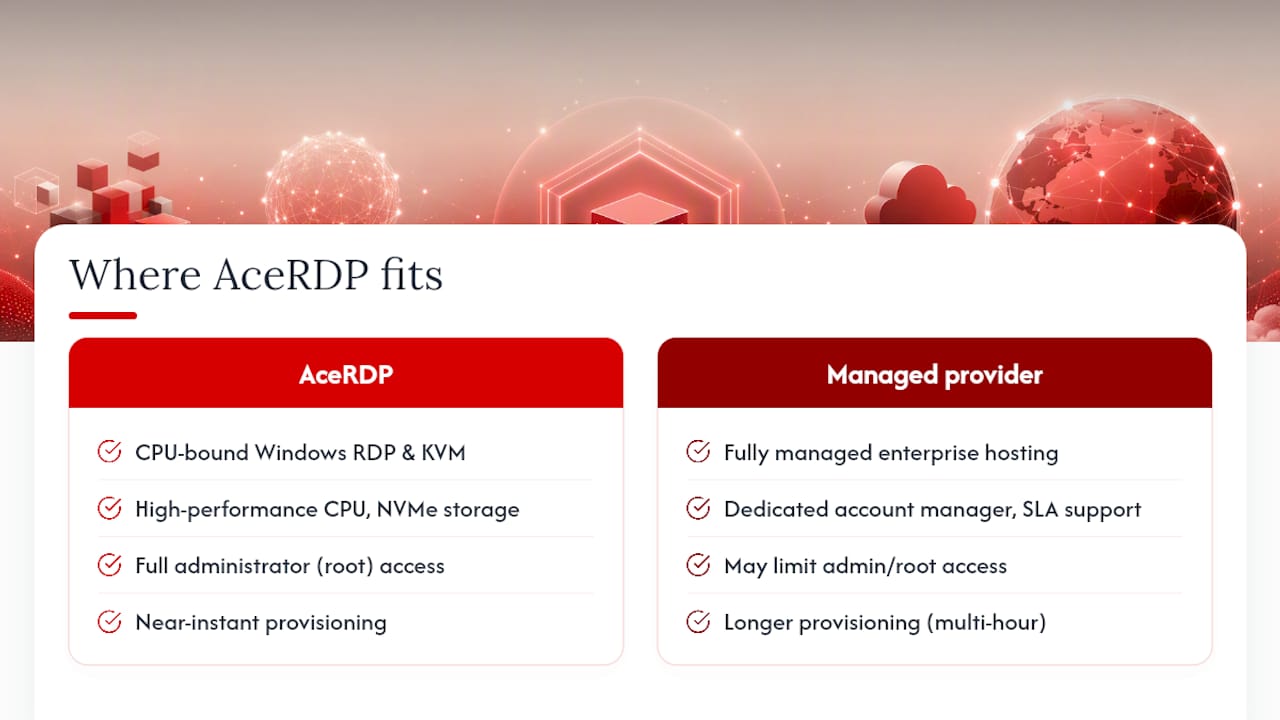
The workloads this suits best are specific: remote desktop access for teams that need a shared Windows environment, automation and bot workloads that lean on CPU more than storage capacity, development environments where you want full control, and any task where latency to a specific region genuinely matters.
Where another provider might make more sense: if you need coverage across a dozen global regions rather than two, or if you specifically want a fully managed enterprise support contract with a dedicated account manager, Liquid Web or a similarly managed-focused provider fits that job better. AceRDP’s model puts control and raw performance in your hands rather than outsourcing server management entirely, and that’s the right fit for some buyers and not others.
— AceRDP
Get Started With AceRDP in Minutes
AceRDP gets you onto a working Windows or Linux VPS faster than most providers on this list, because there’s no manual review queue between your order and a live server. If you’ve been comparing specs across a dozen tabs, the actual difference AceRDP offers is speed to a usable machine: choose a plan built around AMD Ryzen 9 9950X CPUs and NVMe storage, pick Netherlands or US as your location, and your server provisions automatically rather than waiting on a support ticket.

Payment flexibility matters too. AceRDP accepts both credit card and cryptocurrency, which helps if you’re paying from a business account or simply prefer not to hand over card details to every vendor you test. Every plan ships with DDoS protection and full administrator access, so you’re not locked out of the configuration options a managed panel would normally restrict.
If your workload is Windows RDP, automation, or anything that leans hard on CPU and disk speed, check current AceRDP plans and get a server running today rather than waiting on tomorrow’s shortlist.
Sources
FAQ
Which VPS Provider Is the Most Reliable?
Reliability depends on uptime history and support responsiveness rather than any single universal winner. Established names like Liquid Web and Hostinger consistently earn strong reliability marks in editorial testing, while AceRDP’s NVMe-backed infrastructure and instant provisioning make it a dependable pick for CPU-heavy and RDP workloads specifically.
Which VPS Service Provider Is the Best?
There’s no single best provider for every use case. AceRDP is the strongest option for Windows RDP and CPU-intensive tasks, Hostinger leads on overall value, and Liquid Web fits businesses that want fully managed enterprise support.
What Are the Top VPS Server Providers?
The providers that consistently appear across price-tier and performance rankings include AceRDP, Hostinger, Liquid Web, ScalaHosting, Cloudways, Kamatera, InMotion Hosting, and GreenGeeks, each suited to a different combination of budget, management preference, and workload type.
What Are the Top VPS Hosting Providers for Small Business?
Small businesses generally do best with Hostinger or ScalaHosting for straightforward websites and e-commerce, InMotion Hosting for support-heavy needs, or AceRDP when the business runs Windows-based tools, remote access, or automation that benefits from dedicated CPU performance.
Is Managed or Unmanaged VPS Better for Beginners?
Managed VPS suits beginners better because the provider handles OS updates, security patching, and monitoring, removing the technical burden. Unmanaged VPS, like AceRDP’s plans, fits users who want full administrator control and are comfortable configuring their own server environment.


