Dedicated Server vs VPS: Which One Actually Fits Your Workload

Dedicated Server vs VPS: Which One Actually Fits Your Workload
If your app runs fine most of the time but chokes under real traffic, or you’re paying for a VPS plan that already feels tight, the fix usually isn’t “add more RAM.” It’s picking the right architecture. Most workloads, including most business sites, SaaS apps, and remote desktop setups, run perfectly well on a VPS. You only need a dedicated server when you have sustained CPU steal, heavy sustained disk I/O, or a compliance requirement that demands single-tenant hardware.
- Choose VPS if you need flexible scaling, lower upfront cost, and workloads that don’t max out shared resources around the clock.
- Choose dedicated if you’re running database-heavy apps, large-scale virtualization, or workloads where consistent low-latency I/O is non-negotiable.
Quick gut check: if your monthly VPS bill is climbing past what a dedicated plan would cost for the same specs, you’ve already answered the question. Keep reading to find your actual signal.
When to Upgrade from VPS to Dedicated Server
Most workloads perform well on a properly provisioned VPS, and dedicated hardware only pays off once measurable signals like sustained CPU steal or heavy I/O wait confirm you need it.
| Point | Details |
|---|---|
| VPS fits most workloads | Web apps, dev environments, RDP, and automation rarely need dedicated-level resources. |
| Watch measurable signals | CPU steal above 5%, swap activity, and sustained high disk wait mean it’s time to reassess. |
| Dedicated wins on isolation | Bare-metal access removes noisy-neighbor contention and satisfies strict compliance audits. |
| Migration takes real planning | Stage tests, validate I/O improvements, and cut DNS over last with a short TTL. |
| AceRDP narrows the performance gap | Ryzen CPUs, NVMe storage, and instant provisioning make a high-performance VPS a practical fit before jumping to dedicated. |
Table of Contents
- How VPS and Dedicated Servers Actually Work
- Dedicated Server vs VPS: The Factors That Actually Decide It
- When Should You Choose VPS or Dedicated Hosting?
- What Signals Mean You’ve Outgrown Your VPS
- What Migration From VPS to Dedicated Actually Looks Like
- How AceRDP Fits Into This Decision
- How Do Network Bandwidth and Connectivity Compare?
- Does Hosting Type Affect SEO and Uptime?
- Can You Combine VPS and Dedicated in One Setup?
- Our Take: Start Simple, Move When the Data Says So
- Get a High-Performance VPS Built for Real Workloads
- Frequently Asked Questions
- Sources
How VPS and Dedicated Servers Actually Work
A VPS runs inside a hypervisor, the software layer that carves one physical machine into multiple isolated virtual machines, each with its own allocated CPU cores, RAM, and storage. Virtualization works by scheduling resources across all the VMs sharing that physical box, which is efficient but never fully invisible. Every VPS provider draws that line differently. Some overprovision aggressively; others, like AceRDP, keep ratios conservative specifically so Ryzen CPU cores don’t get shared into mush during peak hours.
A dedicated server skips that layer entirely. You get the whole physical machine: every core, every gigabyte of RAM, the full disk, and direct access to hardware features like BIOS settings and IPMI/BMC controls for remote power management. A bare-metal server hands you single-tenant hardware access with zero co-tenant contention, which is exactly why database clusters and compliance-heavy workloads default to it.
Here’s where the tradeoff actually lives. The hypervisor itself adds minimal processing overhead on modern platforms, but it’s also the exact spot where “noisy neighbor” effects originate: another tenant’s spike in disk or network activity can bleed into your VM’s performance even though your allocation didn’t change.
That shows up in three places:
- Latency: virtualized I/O paths add a small but real hop compared to direct hardware access.
- Disk throughput: shared NVMe pools can bottleneck if a neighboring VM hammers storage.
- Hardware features: things like GPU passthrough or custom RAID configurations often require bare metal because the hypervisor abstracts them away.
None of this makes VPS inferior. It makes VPS a different tool, one that trades a sliver of raw ceiling for flexibility, cost, and instant provisioning.
Dedicated Server vs VPS: The Factors That Actually Decide It
Once you get past the architecture, the decision comes down to six measurable factors. Treat this as your checklist, not a philosophy debate.
Performance consistency. VPS performance is usually fine on average but noisier at the tail. Watch P99 latency, not average latency, and check CPU steal (visible in vmstat) rather than raw CPU load. A dedicated server has no steal time by definition because there’s no hypervisor stealing cycles for other tenants.
Scalability and provisioning speed. VPS plans resize in minutes, sometimes seconds, through a control panel. Dedicated hardware upgrades mean physically swapping components or waiting on a provider’s lead time, which can run days. If your traffic is spiky or unpredictable, that speed gap matters more than raw horsepower.
Cost profile. VPS pricing scales in small increments and you only pay for what you provision. Dedicated pricing is a flat, larger monthly commitment regardless of utilization. Tools like the AWS Pricing Calculator are built around exactly this comparison: modeling incremental scaling costs against fixed hardware costs so you can see where the crossover point actually sits for your workload.
Security and isolation. Multi-tenant VPS environments carry a theoretical cross-tenant risk that single-tenant dedicated hardware eliminates outright. For most businesses this is a compliance checkbox, not a real-world incident. For healthcare, finance, or anyone under strict audit requirements, it’s often a hard requirement.
Customization depth. Dedicated servers give you BIOS-level control, custom kernel builds, and hardware RAID configurations. VPS plans, even KVM-based ones with strong isolation, generally limit you to what the hypervisor exposes.
Operational burden. A dedicated server is your hardware to babysit unless you pay for managed service. A VPS provider absorbs hardware failures, replacements, and most infrastructure headaches by default.
- Performance consistency: measure P99 latency and CPU steal, not averages
- Scalability: VPS resizes in minutes, dedicated hardware takes days
- Cost: VPS scales incrementally, dedicated is a flat monthly floor
- Security: single-tenant dedicated removes cross-tenant exposure entirely
- Customization: BIOS/IPMI and custom RAID favor dedicated
- Operations: VPS pushes hardware maintenance onto the provider
Pro Tip: Run iostat -x 1 for a few minutes during your actual peak traffic window, not during a quiet afternoon. A quick five-minute snapshot at 3 AM tells you nothing about whether you need to upgrade.
When Should You Choose VPS or Dedicated Hosting?
Match the workload to the architecture, not the other way around.
- Choose VPS for standard web apps, small-to-mid SaaS products, dev and staging environments, CI/CD runners, and most remote desktop (RDP) use cases. These workloads rarely sustain 100% CPU or I/O for hours at a stretch, so shared infrastructure with strong per-core allocation handles them well, usually at a fraction of dedicated pricing.
- Choose dedicated for database clusters with heavy write volume, large-scale virtualization hosting your own VMs, high-frequency trading systems, or any workload where a millisecond of jitter has real financial consequences.
- Choose dedicated when compliance demands it. Certain regulatory frameworks (particularly in finance and healthcare) require documented single-tenant hardware isolation. If an auditor needs to confirm no other customer’s data ever touched your physical disk, virtualization complicates that conversation even when the risk is negligible.
- Weigh your team’s operational maturity. Dedicated hardware assumes someone on your team, or a managed service you’re paying for, handles firmware updates, RAID rebuilds, and hardware failures. If that’s not a role anyone owns today, a managed VPS closes that gap without the learning curve.
The honest pattern across most provider comparison guides: buyer decisions consistently come down to performance, scalability, cost, security, and management overhead, in roughly that order of how often each one is the deciding factor.
What Signals Mean You’ve Outgrown Your VPS
Stop guessing and start measuring. These are the specific numbers to check.
- CPU steal above 5%. Run
vmstat 1during peak load. If thestcolumn sits consistently above 5%, other tenants on the host are eating your scheduled CPU time. That’s a hard signal, not a maybe. - Swap activity under normal load. If
free -mshows swap usage climbing during regular traffic (not a rare spike), your RAM allocation is undersized or the workload’s working set has outgrown the plan. - Sustained disk wait times. Check
iostat -x 1forw_awaitvalues that stay elevated, not just spike briefly. Community-tested guidance points to persistent high I/O wait as one of the clearest upgrade triggers. - P99 latency spikes that correlate with neighbor activity. If your slowest 1% of requests get dramatically worse during specific hours with no change in your own traffic, that’s noisy-neighbor contention, not your code.
- Cost crossover. Provider comparisons commonly identify practical thresholds, sustained RAM needs above 64GB or persistent CPU steal, where dedicated hardware becomes the cheaper option on a pure cost basis, not just a performance one.
What Migration From VPS to Dedicated Actually Looks Like
Migration isn’t instant, and treating it that way is how outages happen.
- Snapshots vs full images: a snapshot captures disk state quickly for rollback safety; a full image is what you actually restore onto new hardware. Use snapshots before every migration step, not just at the start.
- Stage it first. Spin up the dedicated server in parallel, replicate data, and run the same load patterns you flagged with
iostatandvmstaton the old VPS. Confirm the I/O and latency numbers actually improved before you commit. - Cut over DNS last, with a short TTL set days in advance, and keep replication running until you’ve confirmed the new server handles production traffic cleanly.
- Expect different timelines. A VPS resize happens in minutes. Dedicated hardware provisioning can take anywhere from same-day to a week depending on the provider and specs.
Pro Tip: Never point DNS at the new server until you’ve run it under real production load for at least 24 to 48 hours. Synthetic benchmarks miss the traffic patterns that actually break things.
How AceRDP Fits Into This Decision
AceRDP runs Windows RDP and KVM VPS hosting on AMD Ryzen CPUs with NVMe storage, built specifically to close the gap this article keeps pointing at: the performance ceiling between VPS and dedicated hardware.
- Instant provisioning across multiple locations, including the Netherlands and the US
- DDoS protection and an automated management portal baked into every plan
- Low-latency architecture tuned for remote desktop, development, and automation workloads
- Flexible payment options, including crypto, with 24/7 technical support
For RDP sessions, dev environments, CI pipelines, and most business automation tasks, a Ryzen-powered VPS with NVMe storage handles the workload without the fixed cost and lead time of dedicated hardware.
A business running a mid-traffic SaaS product, a trading bot, or a remote desktop for a small team rarely needs a full dedicated box. It needs consistent CPU allocation and fast storage, which is precisely what a well-provisioned VPS delivers.
If your vmstat numbers are still clean, you likely don’t need dedicated hardware yet. You need better VPS infrastructure.
How Do Network Bandwidth and Connectivity Compare?
Bandwidth allocation is one of the most misunderstood differences between the two. VPS plans typically share a network uplink across the physical host’s tenants, with providers setting per-VM caps to keep any single account from saturating shared capacity. Dedicated servers usually get a guaranteed port speed, commonly 1Gbps or 10Gbps, entirely for your own traffic.
For most workloads this distinction barely matters. A typical web app, RDP session, or small API rarely pushes enough sustained traffic to hit a shared cap. Where it does matter: large file transfers, video streaming platforms, or high-volume API services moving gigabytes per hour. Those workloads can hit throttling on a poorly provisioned VPS even when CPU and RAM look fine.
Latency is a separate concern from raw bandwidth, and it depends more on data center location and network routing than on VPS versus dedicated. A VPS hosted close to your users beats a dedicated server on the wrong continent every time. This is why providers offering multiple regions, rather than a single data center, give you more practical control over latency than the VPS/dedicated choice does on its own.
The real question to ask a provider isn’t “VPS or dedicated,” it’s “what’s the guaranteed uplink speed, and is bandwidth metered or unlimited.” That answer affects your actual user experience more than the hosting model does.
Does Hosting Type Affect SEO and Uptime?
Search engines don’t rank sites based on whether they sit on VPS or dedicated infrastructure. They rank based on outcomes: page speed, uptime, and Core Web Vitals scores, all of which your hosting choice influences indirectly.
A poorly provisioned VPS suffering from CPU steal during traffic spikes will show slower Time to First Byte scores exactly when search crawlers or real visitors show up in volume, which can quietly drag down engagement metrics search engines do factor in. A dedicated server sidesteps that variability entirely since there’s no shared scheduling to contend with.
Uptime tells a similar story. Both hosting types can hit strong uptime numbers when properly managed, but the failure modes differ. A VPS host’s hardware failure typically triggers automated migration to healthy hardware, often with minimal downtime. A dedicated server’s hardware failure means a physical repair or swap, which can mean hours of downtime unless you’re paying for redundant failover infrastructure.
For most small-to-mid businesses, the practical takeaway isn’t “dedicated is better for SEO.” It’s that consistent performance under load, not the underlying architecture, is what protects your rankings and your uptime numbers. A well-resourced VPS with headroom to spare will outperform an overloaded dedicated box every time a traffic spike hits.
Can You Combine VPS and Dedicated in One Setup?
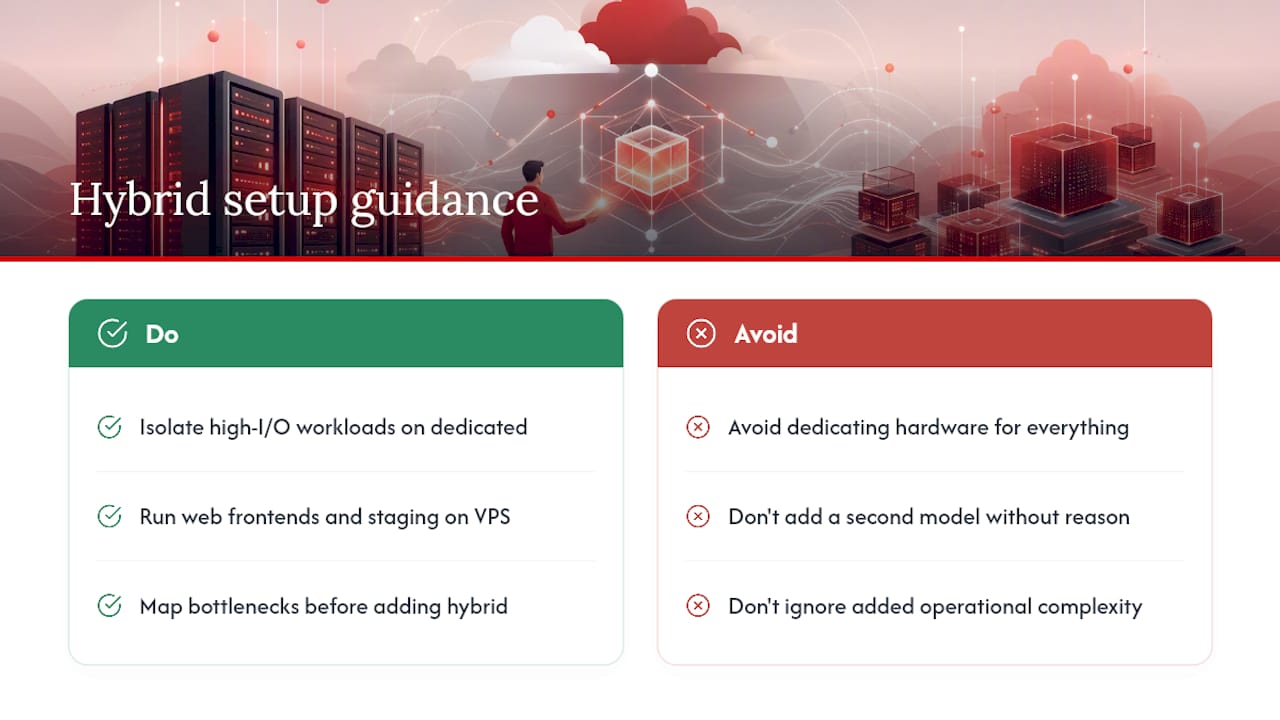
Plenty of growing businesses don’t pick one model exclusively. Hybrid architectures put dedicated hardware behind the workloads that need deterministic performance, database servers, storage backends, or compliance-bound data, while running everything else, web frontends, staging environments, automation scripts, background jobs, on VPS instances.
This split makes financial sense once you map out where your actual bottleneck lives. If your database is the only component sustaining high I/O, paying for dedicated hardware across your entire stack wastes money on components that never approach their limits. Isolating just the demanding piece onto dedicated infrastructure, while keeping flexible, cheaper VPS instances for everything else, is how a lot of mid-size infrastructure actually gets built.
The tradeoff is complexity. Hybrid setups mean managing two different provisioning models, two different scaling processes, and often two different providers or contracts. That’s a real operational cost, not just a technical one.
For most readers weighing dedicated server vs VPS as a binary choice, hybrid is worth knowing about rather than immediately adopting. Start simple: get one workload right on the architecture that fits it, then split off pieces as specific, measured bottlenecks justify the added complexity. Adding a second infrastructure model before you have a clear reason just doubles your maintenance burden for no measurable gain.
Our Take: Start Simple, Move When the Data Says So
Most teams overthink this decision. Start on a well-provisioned VPS, watch your vmstat and iostat numbers under real peak load, and move to dedicated only when those numbers give you a clear, repeated signal, not a one-time spike during a traffic surge.
The businesses that get burned aren’t the ones who chose VPS. They’re the ones who guessed instead of measuring, then either overpaid for dedicated hardware they didn’t need or stayed on an undersized VPS until an outage forced the decision for them. Data beats intuition here every time.
If you’re staring at your metrics and still unsure which way they point, that’s usually a sign you need a second set of eyes on your specific setup rather than a generic threshold.
Get a High-Performance VPS Built for Real Workloads
For most of the scenarios covered here, RDP sessions, dev environments, automation, small-to-mid business apps, you don’t need the fixed cost or lead time of dedicated hardware. You need a VPS that doesn’t buckle under load.

AceRDP runs Windows RDP and KVM VPS hosting on AMD Ryzen CPUs with NVMe storage and conservative resource allocation, built specifically to avoid the CPU steal and I/O contention that push people toward dedicated servers too early. Provisioning is instant, DDoS protection is included, and you can deploy across multiple locations including the Netherlands and the US without a lead-time wait. Pricing scales with your plan instead of locking you into a dedicated-server-sized bill from day one.
If your current VPS is showing the steal or latency signals covered above, check what a properly provisioned plan looks like at AceRDP’s hosting plans before committing to dedicated hardware you might not need yet.
Frequently Asked Questions
Is a VPS as fast as a dedicated server? For CPU-bound workloads on modern hardware, a well-provisioned VPS with NVMe storage often comes close to bare-metal performance. The gap widens for sustained high I/O or very large memory working sets, where dedicated hardware still tends to win.
How much does a VPS cost compared to a dedicated server? VPS pricing scales incrementally with the resources you provision, while dedicated servers carry a higher flat monthly cost regardless of usage. The crossover point where dedicated becomes cheaper usually shows up once you need sustained RAM above 64GB or hit persistent CPU steal on VPS.
Can I run a gaming server on a VPS instead of a dedicated server? Yes, for most small-to-mid player counts. A dedicated server for gaming makes more sense once concurrent player load pushes sustained CPU and network usage high enough to trigger the steal and latency signals covered above.
How long does migrating from VPS to dedicated take? Expect anywhere from a few hours for a simple staged cutover to several days when full data replication and testing are involved. Provisioning lead time on the dedicated side, plus DNS propagation, are usually the biggest variables.
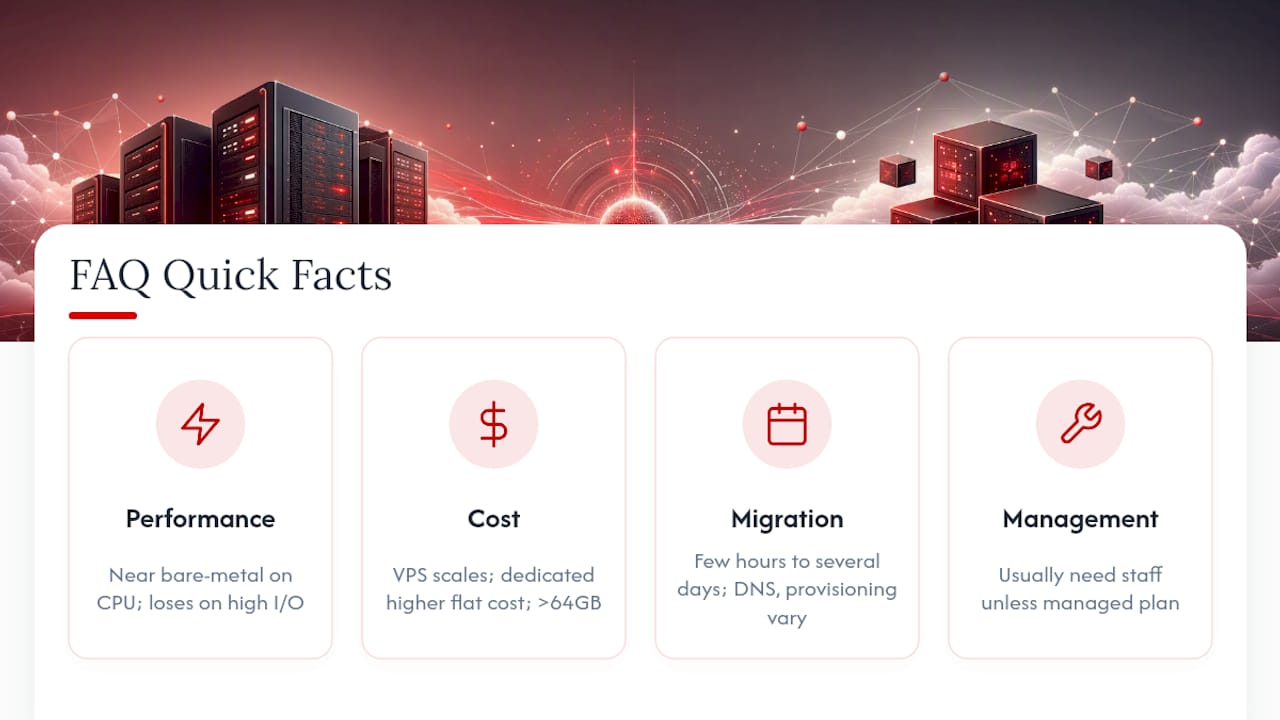
Do I need technical staff to manage a dedicated server? Generally yes, unless you pay for a managed plan. Dedicated hardware puts firmware updates, RAID rebuilds, and hardware failures on your team’s plate, while most VPS providers, including AceRDP, handle underlying infrastructure maintenance by default.


