Save 5 Hours: Managed vs Unmanaged VPS for Businesses, with AceRDP

Save 5 Hours: Managed vs Unmanaged VPS for Businesses, with AceRDP
Managed VPS hosting is a better fit for non-technical business owners, agencies, and anyone running a revenue-critical site who cannot afford downtime while they Google error messages. Unmanaged VPS makes more sense for experienced Linux or Windows sysadmins who want full control over a custom stack and don’t want to pay for support they won’t use. The right call comes down to a simple trade: managed costs more per month but saves hours of admin work, while unmanaged costs less but bills you in time instead of dollars. Providers like AceRDP now offer managed Windows VPS options accessible to smaller budgets.
TL;DR:
- Unmanaged VPS servers require users to handle all setup, security patches, backups, and incident response, often adding several hours of work each month.
- Managed VPS plans include proactive security, monitoring, automated backups, and support, but typically cost between $30 and $100 per month depending on support level.
- Cost comparisons should factor in the value of time spent on server maintenance, as unmanaged hosting can become more expensive when accounting for labor hours at typical freelance rates.
- Switching between managed and unmanaged options involves backing up data, staging the setup, and carefully migrating configurations to ensure smooth transition and operational continuity.
- AceRDP offers a managed Windows VPS solution with full admin rights, instant provisioning, and locations in the US and the Netherlands, suitable for remote desktops and Windows-specific workloads.
Navigating Managed vs. Unmanaged VPS Hosting Options
- Managed vs Unmanaged VPS at a Glance
- What Managed VPS Hosting Actually Includes
- What Unmanaged VPS Hosting Requires From You
- Responsibilities, Support, and Real Cost Compared
- Who Should Choose Managed vs Unmanaged VPS
- What Managed VPS Really Costs, Including the Hidden Parts
- How to Switch Between Managed and Unmanaged VPS
- AceRDP as a Managed Option Worth Considering
- Our Take: Why We Usually Point Business Users Toward Managed
- Get Started With Managed Windows VPS Hosting
- Sources
- FAQ
Managed vs Unmanaged VPS at a Glance
The core difference boils down to who picks up the phone when something breaks. On a managed plan, the host answers. On an unmanaged plan, you do, or you pay someone else to.
Here’s how the responsibilities typically split:
- Managed VPS: the host handles OS setup, patching, monitoring, backups, and security hardening.
- Unmanaged VPS: the host handles only the hardware, network, and hypervisor; everything above that is yours.
- Support: managed plans usually include proactive monitoring and a defined response window; unmanaged support is limited to infrastructure tickets.
- Control: unmanaged gives you full root access with no restrictions on what you install or configure; managed can restrict certain changes to protect stability.
- Price: unmanaged plans commonly run $5 to $30 a month, while managed plans for similar specs often land between $30 and $100 or more, depending on the provider and support tier.
Statistic Callout: An experienced sysadmin typically needs 3 to 6 hours to properly secure a new unmanaged server, plus several more hours every month for patching and monitoring. That time has a dollar value even if no invoice shows up for it.
What Managed VPS Hosting Actually Includes
Managed VPS hosting means the provider takes over the operational work that would otherwise fall on you or an internal IT person. The provider still hands you access to your server, but it also handles the maintenance layer that keeps that server running safely day to day.
Most managed plans bundle these tasks:
- Initial OS installation and configuration, tuned for the workload you’re running.
- Ongoing security patching and firewall management.
- Uptime monitoring with automated alerts (and often automated fixes for common failures).
- Scheduled backups, sometimes with tested restore points rather than just raw snapshots.
- Security hardening: closing unused ports, configuring fail2ban-style protections, and reviewing exposed services.
- Incident response when something goes wrong, from a crashed service to a compromised account.
Not all “managed” plans mean the same thing, and that’s where buyers get burned. Some providers use “managed” to mean a support ticket gets answered within 24 hours. Others mean actual 24/7 proactive monitoring where staff catch a problem before you notice it yourself. Always ask what “managed” covers before paying for it, and get the SLA in writing.
Most managed plans also retain full root or administrator access for the customer, so you’re not locked out of your own server. You just have a safety net if you don’t want to touch the command line.
Control panels like cPanel and Plesk are common inclusions here, letting you manage websites, email, and databases through a browser instead of SSH. That single feature alone eliminates most of the day-to-day command-line work a small business would otherwise need to hire for.
Pro Tip: Ask any managed host for their exact patch cadence and average incident response time before signing up. “We handle security” means nothing without a number attached to it.
What Unmanaged VPS Hosting Requires From You
Unmanaged VPS hosting means the provider’s responsibility stops at the hardware, the network connection, and the hypervisor. Everything that happens inside your virtual server, from the operating system up, is on you.
That includes:
- Installing and configuring the OS (commonly Ubuntu, Debian, or Windows Server).
- Setting up and maintaining the web server, database, and any application stack.
- Applying security patches on your own schedule, not the provider’s.
- Configuring and testing backups (an unmanaged host will rarely do this for you).
- Monitoring uptime and resource usage, usually with tools you set up yourself, like Ansible for configuration management or Docker for containerized deployments.
- Responding to incidents, whether that’s a hacked WordPress plugin or a runaway process eating all your RAM.
The appeal is real: full root access with the provider handling only the base layer means you can build exactly the stack you want, with nothing pre-installed that you didn’t choose. That’s a big deal for developers running custom kernel configurations or unusual software combinations that a managed control panel would fight against.
The time cost is the part people underestimate. Expect several hours for the initial secure setup and a recurring monthly commitment for patching, log review, and general upkeep. If you already run production servers for a living, that’s a Tuesday afternoon. If you don’t, it’s a recurring source of stress that eats into whatever you were actually trying to build.
Responsibilities, Support, and Real Cost Compared
The cleanest way to compare managed and unmanaged VPS is task by task, because “who does what” changes more than the marketing copy suggests.
Patching and updates. On managed plans, the provider applies security patches on a schedule, often within days of a CVE disclosure. On unmanaged plans, patching is entirely your responsibility, and delaying it is the single most common way unmanaged servers get compromised.

Backups. Managed hosts typically run scheduled backups and, on better plans, periodically test that restores actually work. Unmanaged hosts rarely touch your data at all; you configure your own backup routine and you’re the one who finds out during an actual failure whether it worked.
Monitoring and incident response. This is where the “managed” label varies most. Some providers offer genuinely proactive 24/7 monitoring that catches a spike in CPU or a failed service before your customers notice. Others offer reactive support that only kicks in once you file a ticket. Ask directly: is monitoring automated, and what’s the guaranteed response time for a critical incident?
Performance tuning. Managed teams often handle I/O bottlenecks, PHP-FPM worker tuning, or database query caching as part of the service, especially when a site slows down under load. On unmanaged servers, that tuning work is yours, and it requires real familiarity with the stack you’re running. This is one area where paying for expertise genuinely saves money if you’re not confident diagnosing a slow database yourself.
Security posture. Managed providers typically maintain a defined patch cadence, run intrusion detection, and layer in DDoS protection at the network level. Platform-wide security events show why this matters: when a widespread cPanel vulnerability hit hosting providers, customers on managed plans with active response teams stayed online while unpatched unmanaged servers were exposed for as long as their owners took to notice.
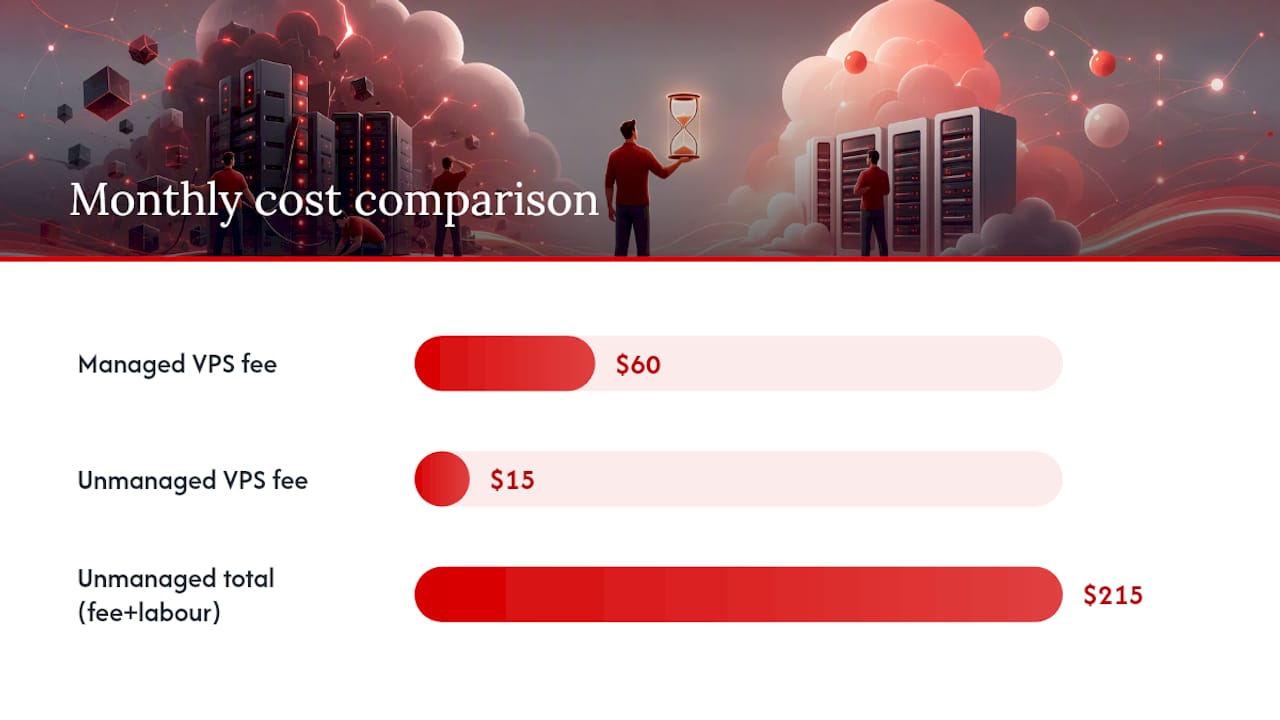
Cost, honestly calculated. A $15/month unmanaged VPS looks cheaper than a $60/month managed plan until you count your own hours. If securing and maintaining that server costs you 5 hours a month and your time is worth $40 an hour, you’ve just spent $200 to save $45. Statistic Callout: at that rate, unmanaged hosting is often the more expensive option once labor is priced honestly, even though the invoice says otherwise.
Who Should Choose Managed vs Unmanaged VPS
Match your situation against these scenarios before you decide.
- Running an online store or customer-facing SaaS product. Downtime costs you sales, not just annoyance. Managed hosting’s proactive monitoring and faster incident response make the premium worth paying.
- Working at an agency managing client sites. You don’t have time to be the on-call sysadmin for a dozen clients. Managed hosting shifts that burden to the provider.
- A non-technical founder or small business owner. If you don’t know what a firewall rule is, you shouldn’t be the one writing them under pressure at 2 a.m.
- A devops engineer with a custom automation pipeline. You already have the tools and habits to maintain a server better than most support teams could. Unmanaged gives you the control without paying for help you won’t use.
- A developer testing an experimental stack or kernel configuration. Managed control panels often restrict exactly the kind of low-level tinkering this work requires.
Run through this checklist: How much free time do you actually have each month? Do you or someone on your team have real sysadmin skills? How costly is an hour of downtime? Do you need a fully custom software stack?
Pro Tip: If you hesitate on more than one of those questions, default to managed. The cost of guessing wrong on server security is almost always higher than the monthly premium.
What Managed VPS Really Costs, Including the Hidden Parts
Price bands vary by resource tier, but the pattern holds across specs. At 2 to 4GB RAM, unmanaged plans often start around $5 to $15 a month, with managed equivalents closer to $30 to $50. At 4 to 8GB RAM, expect roughly $15 to $30 unmanaged versus $50 to $80 managed. At 8 to 16GB RAM, unmanaged can run $30 or more, with managed often crossing $100 depending on support scope.
The sticker price is only half the equation. To find your real cost, multiply your expected monthly maintenance hours by what your time (or your developer’s time) is actually worth, then add that to the unmanaged plan’s price. Compare the total to the managed price.
Watch for these expensive surprises that rarely show up in a monthly quote:
- A ransomware incident with no tested backup, forcing a rebuild from scratch.
- A silently failing backup job that nobody noticed until the day it mattered.
- Email deliverability problems from a misconfigured mail server, costing you client trust for weeks.
How to Switch Between Managed and Unmanaged VPS
Migrating between models is straightforward if you follow the sequence and don’t skip the testing step.
- Back up everything first, including databases, configuration files, and any custom scripts, before touching anything else.
- Spin up a staging environment on the new plan and mirror your current setup before going live.
- Match control panel configurations, since moving from a bare unmanaged install to a managed cPanel or Plesk setup (or vice versa) often means recreating site and mail configurations from scratch.
- Update DNS records carefully, expecting an IP address change and planning for propagation delay.
- Test restores before cutting over, not after. A backup you haven’t restored is a backup you don’t actually have.
- Migrate mailboxes separately from web content, since email migration tends to break in ways that don’t show up until a client says they never got your reply.
If you’re unsure which direction to move, starting unmanaged and adding specific managed services later (backups first, then monitoring) is usually less disruptive than starting managed and stripping support away.
AceRDP as a Managed Option Worth Considering
AceRDP fits squarely into the managed camp, built around AMD Ryzen 9 9950X processors, NVMe storage, and full Windows Server support for businesses that need real remote desktop performance rather than a stripped-down Linux container. Full administrator access comes standard, so you’re never locked out of your own machine the way some managed platforms restrict you.
Server locations in the Netherlands and the United States give you a practical choice for latency depending on where your users or your team actually sit. Provisioning is near-instant, which matters when you need a server running today, not after a support ticket gets triaged.
What AceRDP covers on the managed side: hardware reliability, DDoS protection, network uptime, and platform-level security. What you keep control of: your own Windows configuration, installed software, and application-level settings, since AceRDP gives you full admin rights rather than restricting the server to a fixed template.
Compared with legacy managed hosts built primarily around shared cPanel environments, AceRDP is a stronger fit specifically for Windows RDP and remote-access workloads. If your work involves highly experimental Linux kernel builds or bleeding-edge container orchestration, a Linux-first unmanaged provider may still suit you better.
Pro Tip: If you need Windows-specific performance (trading terminals, remote design workstations, automation bots), check that any host you’re considering actually supports Windows Server licensing before you commit. Not all VPS providers do.
Our Take: Why We Usually Point Business Users Toward Managed
Most of the support tickets that eat a business owner’s week aren’t complicated, they’re just time-consuming at the exact moment a business can least afford the distraction. That’s the real argument for managed hosting: it’s not about technical difficulty, it’s about opportunity cost. A patched, monitored server that just works frees you to spend your hours on the business instead of the infrastructure under it. That said, if you’re the kind of person who finds server administration satisfying rather than draining, unmanaged VPS hosting remains the better economic choice, since you’re already paying yourself for that hour with skills you already have.
— AceRDP
Get Started With Managed Windows VPS Hosting
If the comparison above pointed you toward managed, AceRDP builds its plans specifically for that decision.

Plans scale from lighter Windows RDP setups suited to solo developers and remote workstations up to higher-resource KVM VPS tiers built for agencies and small SaaS teams running production workloads. Onboarding is built around instant provisioning, so a new server is ready to configure within minutes of checkout rather than the next business day. Support stays responsive around the clock, and you can choose a Netherlands or US location depending on where your users are.
If infrastructure budgeting is part of your decision, it helps to understand baseline hardware costs before comparing them against cloud pricing, covered well in this server rack cost guide. When you’re ready to see current specs and pricing tiers, check out the AceRDP plans page and pick the configuration that matches your workload.
Sources
- The pros and cons of managed VPS hosting | TechRadar
- Managed vs Unmanaged VPS: Which Should You Choose? | HostBible
- Managed vs Unmanaged VPS Hosting: Which One Is Right for You? | DeployBase
FAQ
What is the most reliable VPS?
Reliability depends less on the brand and more on the hardware generation, network redundancy, and whether the provider offers proactive monitoring.
What is a managed VPS?
A managed VPS is a virtual server where the provider handles OS setup, security patching, monitoring, backups, and often a control panel, while you retain access to configure your applications.
What is unmetered VPS?
An unmetered VPS is a plan with no cap on data transfer volume, usually limited instead by a fixed network port speed. It refers to bandwidth allowance and is a separate feature from whether a server is managed or unmanaged.
What are the disadvantages of VPS hosting?
Unmanaged VPS hosting demands real technical skill and ongoing time for patching and monitoring, and a mistake can mean downtime or a security breach with nobody else to catch it. Managed VPS avoids most of that risk but costs more per month and can limit certain low-level customizations.


