What Is Remote Desktop Gateway and When Do You Need It?

What Is Remote Desktop Gateway and When Do You Need It?
Remote Desktop Gateway tunnels RDP traffic over HTTPS on TCP port 443, letting authorized users reach internal Windows servers without ever exposing port 3389 to the open internet. That single design choice is why RD Gateway still sits at the center of most Windows remote access architectures, even as VPNs and cloud proxies compete for the same job.
You want RD Gateway when:
- You need remote access to internal Windows servers without deploying a full VPN client on every device.
- You want a single choke point for authentication, authorization, and connection auditing instead of scattered firewall rules.
- You’re already running Remote Desktop Services and need to layer Network Level Authentication, MFA, or Conditional Access on top of it.
Essential Best Practices for Secure RD Gateway Deployment
RD Gateway secures remote access by tunneling RDP over HTTPS on port 443, but it only works when paired with NLA, MFA, and publicly trusted certificates.
| Point | Details |
|---|---|
| Core function | RD Gateway tunnels RDP over TCP 443 instead of exposing port 3389 directly to the internet. |
| Certificates decide success | Use a publicly trusted CA in production; self-signed certs are the top cause of connection failures. |
| CAP and RAP define access | CAP controls who connects, RAP controls what they can reach; audit both quarterly. |
| Layer security controls | Combine NLA, MFA, Conditional Access, and network segmentation for real defense-in-depth. |
| Managed alternative available | AceRDP offers Windows RDP and VPS hosting on Ryzen infrastructure for teams that want to skip the ongoing gateway maintenance. |
Table of Contents
- Remote Desktop Gateway Prerequisites You Need Before Installing
- How Do You Deploy and Configure RD Gateway?
- What Security Controls Does RD Gateway Actually Need?
- Why Does Certificate Choice Make or Break Your Deployment?
- What Should You Monitor Once RD Gateway Is Live?
- Can RD Gateway Scale for High Availability?
- When Should You Consider Alternatives to RD Gateway?
- What Do Practitioners Get Wrong About RD Gateway?
- When Should You Keep RD Gateway In-House?
- AceRDP: A Managed Alternative to Running Your Own Gateway Stack
- Sources
Remote Desktop Gateway Prerequisites You Need Before Installing
Before you touch Server Manager, confirm the environment can actually support the role. RD Gateway runs on Windows Server (2016 through 2025), and you’ll decide early whether it lives on a dedicated box or shares a server with other RDS roles. For small deployments, combining roles is fine. For anything client-facing, separate it.
- Domain-joined server with Active Directory in place, plus an admin account with rights to install roles and configure Group Policy.
- A public FQDN that resolves correctly in DNS, since clients connect using that name, not an internal hostname.
- TCP 443 open inbound at the firewall; UDP 3391 optional if you want the newer UDP transport for better performance on lossy connections.
- A certificate plan and a rough sense of RDS CAL licensing costs before you start, since both affect budget and timeline.
How Do You Deploy and Configure RD Gateway?
Installation itself is the easy part. The configuration choices you make around it, certificates, CAP, RAP, determine whether the deployment is secure or just looks secure.
- Install the role. Use Server Manager’s Add Roles wizard and select Remote Desktop Services, then RD Gateway, or run it from PowerShell with
Install-WindowsFeature RDS-Gateway -IncludeManagementTools. Microsoft’s deployment guide walks through both paths. - Import and bind your SSL certificate. Import the PFX into the server’s certificate store, then bind it in the RD Gateway Manager console. The certificate’s CN or SAN must exactly match the public FQDN clients will type, or every connection attempt throws a trust warning.
- Create a Connection Authorization Policy (CAP). This defines who is allowed to connect, tied to an AD security group, with NLA required and, ideally, an MFA condition layered in.
- Create a Resource Authorization Policy (RAP). This defines what those authenticated users can actually reach, scoped to specific servers or an AD group of computers, never “any resource.”
- Configure the client. In
mstsc, open Advanced, then Settings under “Connect from anywhere,” and enter the gateway’s FQDN. If you’re distributing.rdpfiles instead, setgatewayhostname:s:andgatewayusagemethod:i:1directly in the file. - Validate the connection. Test from outside your network, not from inside it, since internal DNS often masks external resolution problems. Confirm the CAP is being matched (check Event Viewer under RD Gateway logs) and that the RAP actually permits the target host.
If a connection fails, check these first: certificate name mismatch, firewall blocking 443 outbound on the client side, CAP requiring a group the test user isn’t in, or RAP scoped too narrowly. Most “RD Gateway is broken” tickets trace back to one of those four.
Pro Tip: Keep a second RAP scoped to a single test server with wide-open group membership. When troubleshooting, connect through that RAP first. If it works, your problem is authorization scope, not the gateway itself, and you just saved yourself an hour of chasing certificates.

Windows Server 2025 deployments follow the same core sequence, though Microsoft’s updated TLS handling and tighter NPS integration for RADIUS-based MFA make the 2025 walkthrough worth reading before you standardize your build.
What Security Controls Does RD Gateway Actually Need?
RD Gateway reduces your attack surface, but it doesn’t secure anything by itself. It’s a transport layer sitting in front of authentication that target systems still have to enforce. Treat it as one layer in a stack, not the whole stack.
- Enforce NLA on every target host. Without it, RD Gateway is authenticating the tunnel while the destination server accepts weaker legacy auth.
- Layer MFA in front of the CAP, either through the NPS extension for Azure MFA or full Entra integration, so a stolen password alone isn’t enough to get through.
- Use Conditional Access where you can. Pairing RD Gateway with Entra Application Proxy verifies identity before traffic ever reaches the gateway server, not after.
- Segment the network so gateway servers sit in a DMZ or restricted subnet, isolated from the resources they broker access to.
- Restrict device redirection (drives, clipboard, printers) unless a specific business case requires it, and set idle session timeouts aggressively.
- Forward RD Gateway logs to your SIEM. Repeated failed CAP matches from the same source IP is the clearest brute-force signal you’ll get.
Defense-in-depth isn’t optional here. RD Gateway blocks direct exposure of port 3389, but a gateway with no MFA, no NLA, and no segmentation is just a fancier front door on the same house.
Why Does Certificate Choice Make or Break Your Deployment?
Self-signed certificates are the single most common cause of RD Gateway support tickets, and it’s almost always because clients outside your domain never installed the private CA’s root certificate. Use a publicly trusted CA in production. It costs more than “free,” but it eliminates a whole category of trust errors on day one.
- Match the certificate’s CN or SAN exactly to the FQDN your clients type. Wildcard certs work fine if the domain structure supports them.
- Bind the PFX through RD Gateway Manager, and make sure the private key is exported with it. A cert without its private key won’t bind.
- For renewal, automate it. ACME-based issuance or a scripted internal PKI with GPO-based root distribution beats manually re-importing a cert every 90 or 365 days.
- If you’re stuck with internal PKI for cost reasons, distribute the root CA via Group Policy to every client machine before rollout, not after complaints start.
- Common error: “The remote computer could not be authenticated due to problems with its security certificate” almost always means CN mismatch or an untrusted root, in that order of likelihood.
What Should You Monitor Once RD Gateway Is Live?
Deployment is day one. Operations is every day after. Track active session counts, CPU and memory on the gateway, and connection success versus failure rates, along with RDS CAL consumption if you’re near a licensing ceiling.
- Forward RD Gateway event logs to your SIEM and alert on repeated authentication failures, a classic brute-force pattern.
- Schedule certificate expiration checks well ahead of renewal, monthly patch windows, and a quarterly audit of every CAP and RAP still in use.
- Script routine health checks with PowerShell rather than checking consoles manually. A five-line script that queries active session count beats a login every morning.
Can RD Gateway Scale for High Availability?
Yes, and the gateway layer makes it easier than you’d expect because it’s stateless. No session persistence is required between the load balancer and the gateway nodes, so you can add or remove nodes without breaking active connections mid-session.
- Use Network Load Balancing (NLB) or a cloud load balancer in front of multiple RD Gateway servers behind one public FQDN.
- Deploy the same certificate across every node so clients see a consistent identity regardless of which server answers.
- Place gateway nodes geographically close to your largest user population to cut latency, especially for graphics-heavy remote sessions.
- Size each node for peak concurrent connections, not average load; gateways tend to spike hard during business-hours logins.
When Should You Consider Alternatives to RD Gateway?
RD Gateway isn’t the only route to secure remote access anymore, and for some teams it isn’t the best one. Entra Application Proxy pre-authenticates users and applies Conditional Access before traffic ever touches your network, which shifts risk earlier in the chain than RD Gateway can on its own.
- Azure Virtual Desktop replaces the entire on-prem RDS stack, including RD Gateway, session hosts, and connection brokers, trading control for reduced management overhead.
- Clientless browser access works well for occasional users or BYOD scenarios but sacrifices some performance and local device integration.
- Open-source implementations like RDPGW offer a lightweight alternative for teams that want gateway functionality without the full Windows Server licensing footprint, though they carry less official support.
- If your infrastructure sits behind a reverse proxy or load balancer already, a partner like RotatingProxyHub illustrates the kind of network layer that keeps origin servers from being directly exposed, a principle worth applying to gateway placement too.
What Do Practitioners Get Wrong About RD Gateway?
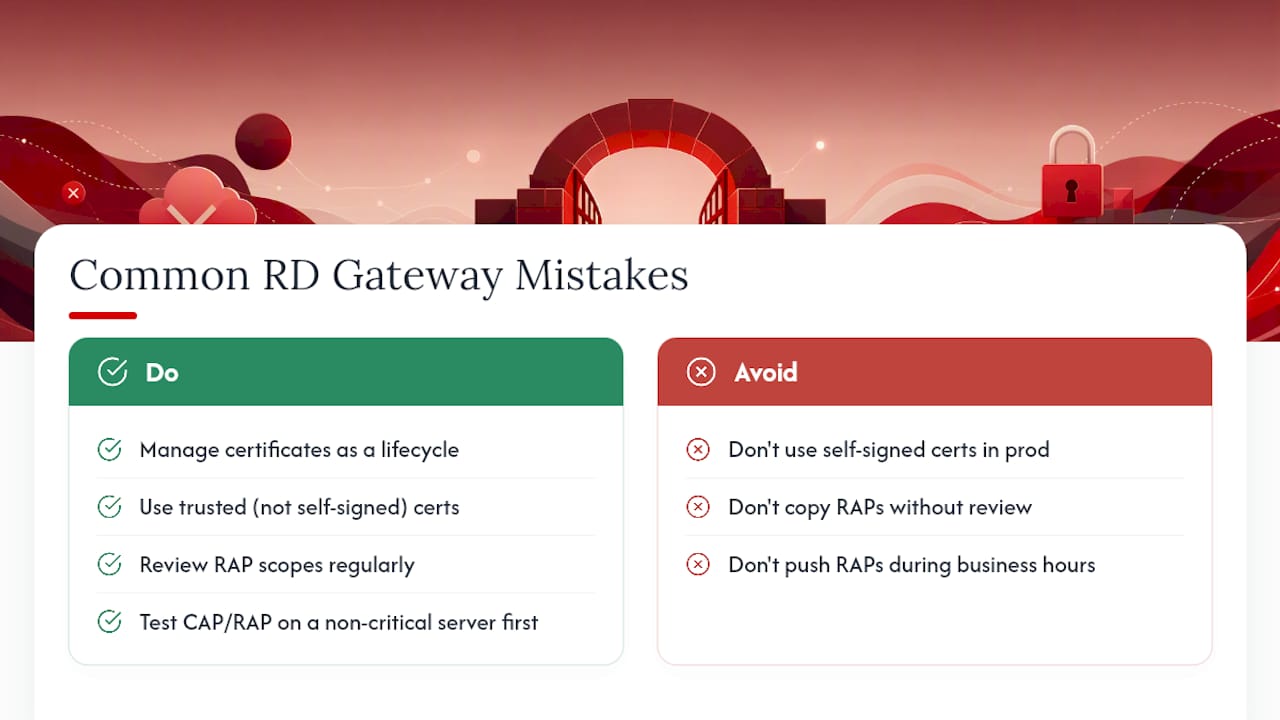
The recurring mistake is treating certificate setup as a one-time task instead of a lifecycle. Self-signed certs slip through in test environments and quietly make it to production, where they break trust for every external client. The second mistake: RAP scopes copied from a template and never revisited, so departed employees’ access groups still resolve to live servers months later.
Pro Tip: Before rolling out any CAP or RAP change, test it against one non-critical server first. A misconfigured RAP pushed to production during business hours locks out real users fast, and rollback under pressure is when mistakes compound.
When Should You Keep RD Gateway In-House?
Running RD Gateway yourself makes sense when you need tight control over CAP/RAP policy, on-prem AD integration, or compliance requirements that demand infrastructure you own outright. If certificate renewals, patch cycles, and HA configuration are eating time your team doesn’t have, offloading to managed VPS or RDP hosting trades some control for far less operational overhead. Match the choice to your actual maintenance capacity, not your ideal one.
AceRDP: A Managed Alternative to Running Your Own Gateway Stack
Not every team wants to own certificate renewals, CAP/RAP audits, and patch windows indefinitely. AceRDP gives you managed Windows RDP and KVM VPS hosting on AMD Ryzen infrastructure with NVMe storage, so you get fast remote access provisioned in minutes instead of a multi-day RD Gateway build.

If your priority is getting a secure, high-performance Windows environment online without staffing the ongoing maintenance an RD Gateway deployment demands, AceRDP handles provisioning, DDoS protection, and infrastructure management while you focus on the workload running on top of it. Instant provisioning means you’re not waiting on certificate binding or CAP troubleshooting before your team can connect. Spin up a Windows RDP or VPS plan and get a working remote desktop environment running today.
Sources
Start with Microsoft’s official RD Gateway deployment guide and the Remote Desktop Services overview for architecture and role context before configuring your environment.
- Remote Desktop Services overview - Microsoft Learn
- How to Set Up Remote Desktop Gateway on Windows Server 2025 - Progressive Robot


