Start at a 1:1 Baseline: vCPU vs CPU Cores for Sysadmins
Start at a 1:1 Baseline: vCPU vs CPU Cores for Sysadmins
A vCPU is a virtual processor thread the hypervisor schedules onto a physical logical processor. A CPU core is silicon hardware. There’s no fixed conversion between the two because the ratio depends on hyperthreading, workload behavior, and scheduler load. Start performance-critical VMs at a conservative 1:1 vCPU-to-pCPU baseline, then adjust based on what monitoring actually shows.
TL;DR:
- Oversubscription of vCPUs causes contention, increasing CPU ready and steal times that can degrade performance more than traditional utilization metrics indicate.
- The mapping between vCPUs and physical cores depends heavily on hyperthreading and scheduler behavior, making static ratio assumptions unreliable for sizing.
- Performance-critical workloads benefit from a conservative 1:1 vCPU-to-pCPU baseline, adjusted based on real-time monitoring rather than fixed formulas.
- Proper vCPU sizing for databases and latency-sensitive applications requires dedicated cores and NUMA-aware placement to minimize latency and memory access delays.
- Pairing high-performance storage, like NVMe, with appropriate CPU allocation greatly reduces disk-induced latency, especially in remote desktop and interactive workloads.
Table of Contents
- vCPU vs CPU Cores: Hardware vs Virtual at a Glance
- How vCPUs Actually Map to Cores and Threads
- Why Oversubscription Wrecks Latency (and How to Catch It)
- How to Size vCPUs the Right Way
- A Practical Checklist by Workload Type
- Where AceRDP Fits Into the Sizing Picture
- Sources
- FAQ
vCPU vs CPU Cores: Hardware vs Virtual at a Glance
The distinction sounds academic until a database starts choking under load nobody predicted. A physical core executes instructions on dedicated silicon. A vCPU is a scheduling construct: the hypervisor hands it a time slice on whatever logical processor is free.
That difference cascades into everything else:
- Isolation: a physical core is exclusive to whatever process the OS assigns it; a vCPU shares its underlying logical processor with other VMs’ vCPUs unless pinned.
- Performance profile: dedicated cores deliver consistent latency; vCPUs introduce variability tied to host contention.
- Scalability: vCPUs let you oversubscribe a host well past its physical core count, which is exactly how cloud providers make consolidation profitable.
- When to choose which: pick dedicated cores or low oversubscription for databases and latency-sensitive apps; pick standard vCPU allocation for stateless, burst workloads like web frontends.
The MakeUseOf breakdown of CPU vs. vCPU frames it well: vCPUs maximize utilization across a fleet, but they lag dedicated cores the moment a workload needs sustained, uninterrupted compute.
How vCPUs Actually Map to Cores and Threads
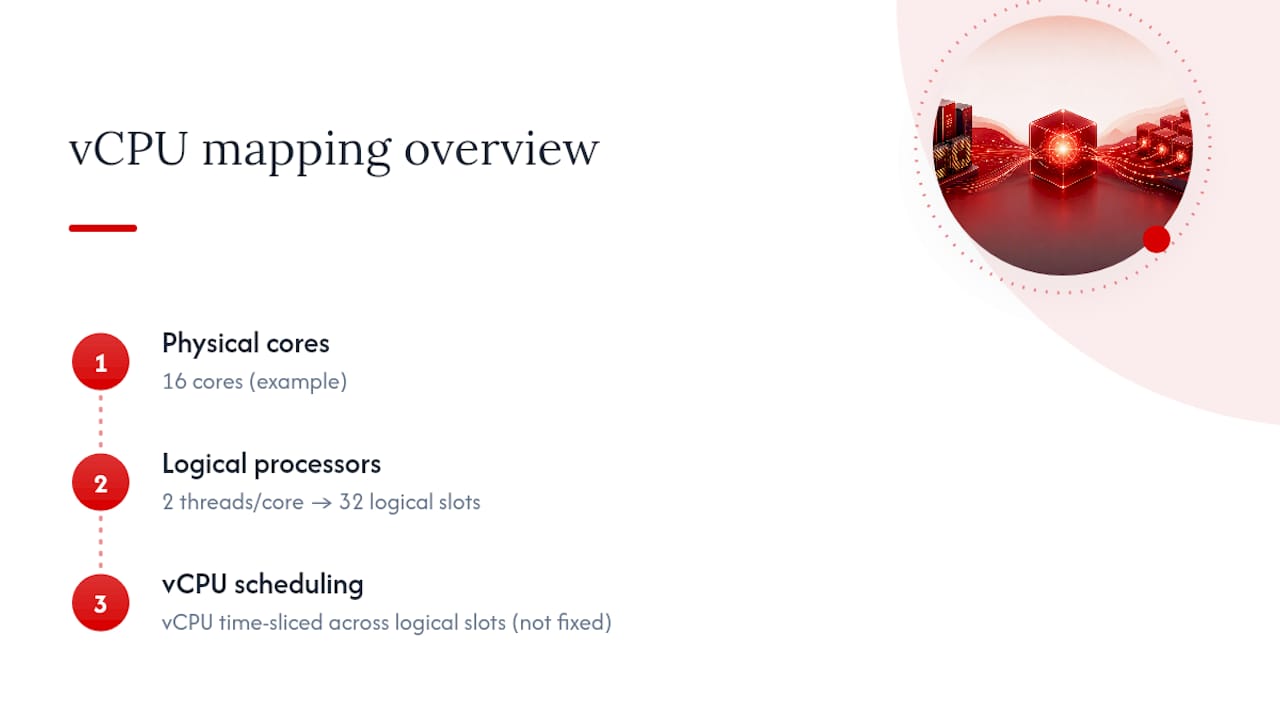
Here’s where most sizing mistakes start. A host’s logical processor count equals physical cores multiplied by threads per core. With Intel’s SMT (branded Hyper-Threading) or AMD’s SMT, that’s usually 2 threads per core, so a 16 core CPU presents 32 logical processors to the hypervisor.
A vCPU maps to one logical processor slot at any given moment, not to a fixed physical core. Modern hypervisors time slice vCPU threads across whatever logical processor is available, and that assignment shifts continuously as the scheduler rebalances load. Intel’s own guidance on logical processors confirms there’s no universal formula for converting vCPU counts to physical cores. It depends entirely on whether SMT is enabled and how the hypervisor’s scheduler behaves under load. On non-SMT platforms, including many Arm server chips, the math is simpler: 1 vCPU tracks close to 1 physical core because there’s no second thread to schedule against.
Guest OS and hypervisor limits complicate this further. VMware’s vSphere documentation sets maximum vCPU counts per VM and lets you configure cores per socket independently from total vCPU count.
Pro Tip: Check your guest OS licensing before you set cores per socket. Some Windows and application licenses count sockets, not cores, so configuring 8 vCPUs as 1 socket with 8 cores instead of 8 sockets with 1 core each can cut licensing costs without touching performance, according to DiskInternals’ notes on VMware core configuration.
Why Oversubscription Wrecks Latency (and How to Catch It)

Oversubscription means assigning more total vCPUs across your VMs than the host has logical processors to serve simultaneously. It’s the default state of most virtualized infrastructure, and it works fine until it doesn’t.
The failure mode is contention: vCPUs queue up waiting for a logical processor to free up, and that wait shows up as CPU ready time on the hypervisor side and steal time inside the guest. Watch these numbers, not just aggregate CPU utilization:
- CPU ready (VMware) or equivalent scheduler-wait metrics show how long a vCPU sat idle waiting for physical time, even while the guest reports low CPU usage.
- Steal time in Linux guests (visible via
toporvmstat) flags cycles the hypervisor took away mid-execution. - NUMA locality matters for memory-heavy workloads. A vCPU scheduled on a core far from the memory bank it’s reading from pays a latency penalty every access, and the relationship between multicore CPUs and vCPUs makes clear that NUMA-aware placement often beats simply adding vCPUs.
- CPU affinity or pinning dedicates specific pCPUs to a VM’s vCPUs, trading flexibility for predictability. Reserve this for workloads where jitter, not raw throughput, is the enemy.
How to Size vCPUs the Right Way
Skip the spreadsheet ratios you inherited from a 2015 blog post. Size vCPUs the way VMware itself now recommends: measure, don’t guess.
- Set a conservative baseline. Start performance-critical VMs at 1:1 vCPU to pCPU and write down why you chose that number. VMware’s current vCPU-to-pCPU guidance explicitly retires static ratios like 4:1 in favor of this measurement-first approach.
- Instrument both layers. Pull CPU ready and steal time from the hypervisor, run queue length from the guest, and pair those with real application KPIs like request latency or query time.
- Load test before scaling up. Push realistic traffic at the VM and watch for contention signals appearing before you add vCPUs, not after users complain.
- Manage capacity as a pool. Use DRS or equivalent automated balancing and alert on sustained contention, treating vCPU allocation as a living number rather than a one-time provisioning decision.
A Practical Checklist by Workload Type
Different workloads tolerate oversubscription differently, and pretending otherwise is how “it worked in staging” becomes a 3 AM page.
- Web frontends and stateless services: higher consolidation is fine here. Monitor 95th-percentile CPU and p95 latency rather than averages, since averages hide the spikes that matter.
- Databases and HPC workloads: dedicate cores or keep oversubscription minimal, and favor NUMA-aware vCPU placement so memory access stays local.
- CI/CD and batch jobs: size for peak concurrency, not average load, and lean on autoscaling rather than permanently overprovisioning idle capacity.
- RDP and remote desktop workloads: prioritize raw core performance and low-latency I/O over squeezing extra vCPU density onto a host, since interactive sessions punish jitter far more than they reward consolidation.
For that last category, storage speed matters almost as much as CPU headroom. NVMe backing keeps disk wait time from masquerading as a CPU problem.
Where AceRDP Fits Into the Sizing Picture
Pair that with NVMe storage and you eliminate the disk latency that often gets misdiagnosed as a CPU sizing problem on RDP and Windows Server workloads.
AceRDP’s plans give you full administrator access on both Windows Server and KVM-based Linux instances, with data centers in the Netherlands and the US and provisioning that’s typically instant rather than queued. That combination suits database instances, compute-heavy automation, and remote desktop deployments where the sizing principles above actually apply. If your workload needs guaranteed dedicated cores at massive scale, an enterprise-tier dedicated host from a hyperscaler may fit better, and larger organizations running hundreds of VMs may prefer a platform with built-in DRS-style pooling. For most developers, agencies, and power users provisioning one to a handful of servers, AceRDP’s Ryzen-based VPS plans hit a pricing and performance point worth comparing against.
— AceRDP
Sources
- Intel support: logical processors and vCPU considerations
- VMware Cloud Foundation blog: vCPU to pCPU ratio guidelines
- VMware vSphere docs: virtual CPU configuration and limitations
FAQ
Is 1 vCPU Equal to 1 Physical Core?
Not necessarily. A vCPU is a scheduled thread, and whether it maps closely to a full physical core depends on whether SMT/hyperthreading is enabled and how busy the host is; on non-SMT hardware the mapping is closer to 1:1.
How Many Cores Do 4 vCPUs Actually Use?
When SMT is enabled and two logical processors per core exist, a small number of vCPUs can be served by fewer physical cores, though the hypervisor may spread them across more cores depending on scheduling and contention.
Does 4 Cores Mean 4 CPUs?
No. “Cores” and “CPUs” (sockets) are different layers: a single physical CPU chip can contain 4, 16, or many more cores, and each core can expose multiple logical processors if SMT is active.
What’s the Safest Starting vCPU-to-Core Ratio?
A 1:1 vCPU-to-pCPU baseline for performance-critical VMs, per current VMware guidance, with adjustments made only after monitoring shows headroom rather than as a fixed policy.


