When $12 KVM Beats a $4 OpenVZ Container: KVM vs OpenVZ for VPS Buyers

When $12 KVM Beats a $4 OpenVZ Container: KVM vs OpenVZ for VPS Buyers
KVM is the safer default for most modern VPS needs. It gives you a full virtual machine with its own kernel, real Docker support, and predictable resource limits. OpenVZ still has a place for ultra-budget, Linux-only workloads like a static site or a throwaway dev container, where kernel control and migration risk don’t matter. Outside that narrow lane, pick KVM.
TL;DR:
- OpenVZ offers lower-cost VPS options with high container density but shares a single kernel, increasing security and stability risks.
- KVM provides full hardware virtualization with independent kernels, supporting Docker, Windows, and custom modules, ideal for production environments.
- KVM enforces strict resource reservations and better handles high I/O workloads, while OpenVZ is more vulnerable to noisy neighbor issues during capacity overselling.
- Moving from OpenVZ to KVM or scaling resources later is simpler with KVM, which supports live migration and full snapshots, unlike OpenVZ.
- Providers like AceRDP favor KVM for dedicated resources, kernel control, and compatibility with complex workloads such as Docker and Windows servers.
Table of Contents
- KVM vs OpenVZ: Architecture and Isolation Explained
- KVM vs OpenVZ Performance: Theory vs Real-World Behavior
- Docker, Custom Kernels, and OS Support: Where OpenVZ Falls Short
- Which Should You Pick: KVM or OpenVZ?
- Scaling, Snapshots, and What to Ask Before You Buy
- Security Track Record: KVM and OpenVZ Vulnerability History
- Licensing and Cost: What You’re Actually Paying For
- How AceRDP Approaches KVM for Real Customer Workloads
- Get a KVM VPS Built for What You’re Actually Running
- Sources
- FAQ
KVM vs OpenVZ: Architecture and Isolation Explained
The core difference between KVM and OpenVZ comes down to what actually gets virtualized. KVM is full hardware virtualization built directly into the Linux kernel, using CPU extensions like Intel VT-x and AMD-V to run each virtual machine as its own isolated operating system, complete with its own kernel. Your KVM VPS behaves like a physical server that happens to be virtual. Nothing about it knows, or cares, what else runs on the same host.
OpenVZ works differently. It’s OS-level containerization, meaning every OpenVZ instance shares a single host kernel. Newer OpenVZ and Virtuozzo builds have improved cgroup support, but the fundamental constraint hasn’t changed: your container is a fenced-off slice of the same kernel every other tenant on that node is using.
That shared kernel creates a real isolation gap. A kernel panic, a kernel-level exploit, or a bug in a shared kernel module can affect every container on the host at once. With KVM, a crash inside one VM stays inside that VM. It’s the difference between renting an apartment in a building where a fire in one unit can spread through shared ductwork, versus renting a standalone house.
Practical implications worth weighing before you commit to either:
- Security surface: A kernel vulnerability on an OpenVZ host is a shared-tenant risk; on KVM, it’s isolated to your own instance.
- Kernel updates: OpenVZ users can’t patch or swap their own kernel. KVM users can.
- Fault domains: One misbehaving container can, in rare cases, degrade host stability for neighbors on OpenVZ. That risk doesn’t exist the same way on KVM.
- Reliability of custom configs: Anything relying on kernel-level tuning behaves predictably on KVM and inconsistently on OpenVZ.
KVM vs OpenVZ Performance: Theory vs Real-World Behavior
On paper, containers win the efficiency argument. A minimal container can idle at roughly 30 to 60MB of RAM, while a comparable full VM idles at 200 to 400MB just running its own kernel and system services. That gap is why OpenVZ plans are cheap: providers pack far more containers onto a single node than they could ever fit with KVM instances.
But that density is exactly what causes trouble. When a host oversells OpenVZ capacity, you get noisy neighbor problems: your CPU shows as available in the dashboard, yet response times crawl during another tenant’s traffic spike. KVM enforces resource reservations more strictly, so what you’re allocated is closer to what you actually get.
By the numbers: container idle memory footprint runs roughly 30 to 60MB versus 200 to 400MB for a VM, a gap providers exploit to keep OpenVZ pricing low.
Watch for these signals of host contention:
- CPU steal time showing up in
topor monitoring dashboards - Disk I/O latency spikes with no matching load on your own processes
- Inconsistent benchmark results at different times of day
VM overhead matters most for I/O-heavy databases and high-concurrency apps. Container efficiency wins for lightweight, low-traffic services that don’t need guaranteed throughput.
Docker, Custom Kernels, and OS Support: Where OpenVZ Falls Short
This is where the KVM vs OpenVZ decision gets concrete fast. KVM runs any operating system, Linux, Windows, BSD, whatever the image supports, and gives you full Docker and nested container capability because you control the kernel. Need a custom kernel module, a specific ZFS build, or WireGuard’s kernel-mode implementation? On KVM, you install it yourself.
OpenVZ is Linux-only, period, and it’s locked to whatever kernel the host is running. Docker and other container runtimes need kernel features like namespaces, cgroups, and overlayfs; on a shared OpenVZ kernel, those features are host-dependent and often flaky or missing entirely.
Before you buy, check for:
- Docker or Podman support (confirmed, not just “should work”)
- Windows or BSD availability (KVM only)
- WireGuard, OpenVPN’s TUN/TAP device access
- ZFS or other custom kernel modules
- Ability to load your own kernel modules at all
Pro Tip: Email the provider before you buy and ask them to confirm Docker support explicitly on the exact plan you’re considering. “Docker works on our VPS” often means it works on their KVM line, not the OpenVZ tier you’re eyeing.
Which Should You Pick: KVM or OpenVZ?
Match the platform to the job, not the price tag alone.
- Choose KVM if you’re running production workloads, anything with Docker or Kubernetes, a Windows server, compliance-sensitive infrastructure, or anything that needs consistent, guaranteed performance. This covers most business and development use cases.
- Choose OpenVZ if you’re on a genuinely micro budget, running a simple static Linux site with no containers, or spinning up a temporary test instance you’ll tear down in days. OpenVZ’s lower cost makes sense here because the downside risk is small and short-lived.
- Apply the rule of thumb: if you can’t say with confidence you’ll never need Docker, a custom kernel, or Windows, start on KVM. Moving a container workload onto a full VM later is far less painful than discovering your OpenVZ container can’t run the exact tool your team now depends on.
The migration math favors starting on KVM even if you’re slightly overpaying at first. Downgrading resources is trivial. Migrating an entire application off a container architecture because it hit a kernel-feature wall is not.
Scaling, Snapshots, and What to Ask Before You Buy
Scaling looks different on each platform. KVM instances support live migration between hosts with minimal downtime and full-state snapshots that capture memory, disk, and running processes. OpenVZ snapshots are typically disk-only, and live migration between nodes is far less consistent because the container is tied to the host kernel’s exact state.
Moving a container-based app to a full VM later usually means rebuilding the environment from scratch, not a clean lift-and-shift. Moving from KVM to a container is comparatively easier since you’re subtracting isolation, not adding it.
Before signing up, ask any provider:
- What kernel version is running, and can it be updated?
- What’s the oversubscription policy on this plan tier?
- Is TUN/TAP device access enabled for VPN use?
- Is Docker officially supported, or just “possible”?
Security Track Record: KVM and OpenVZ Vulnerability History
Both platforms have shipped real vulnerabilities, but the blast radius differs by design. KVM’s hypervisor has had escape vulnerabilities disclosed over the years, flaws that in theory let a malicious guest reach host-level code. These are rare, get patched quickly through kernel and QEMU updates, and stay contained to the affected VM even in a worst case, since neighboring VMs run entirely separate kernels.
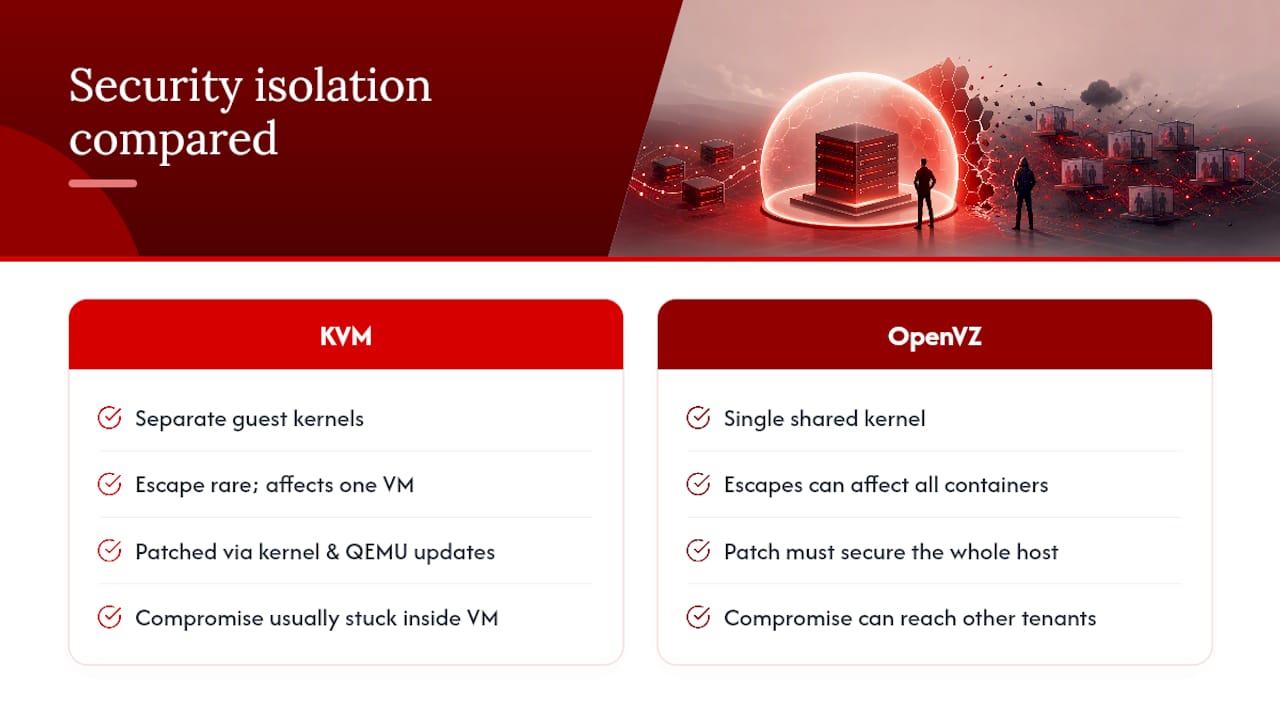
OpenVZ’s risk profile is structurally different because every container shares one kernel. A privilege-escalation bug in that shared kernel, or a container-escape flaw, doesn’t just threaten one tenant. It threatens every container on the node. This is precisely why shared-kernel systems get audited so heavily for namespace and cgroup isolation bugs: a single miss compromises the whole host, not one customer.
The practical exploit scenarios differ too. On KVM, an attacker who compromises your VM is stuck inside it unless they find a hypervisor escape, historically a hard, high-value bug. On OpenVZ, an attacker inside one container is one kernel-level flaw away from reaching every other tenant on that node. Neither platform is inherently unsafe when patched and configured correctly, but KVM’s isolation model gives you a real security boundary. OpenVZ gives you a thinner one that depends heavily on how disciplined the host provider is about kernel patching and container hardening.
Licensing and Cost: What You’re Actually Paying For
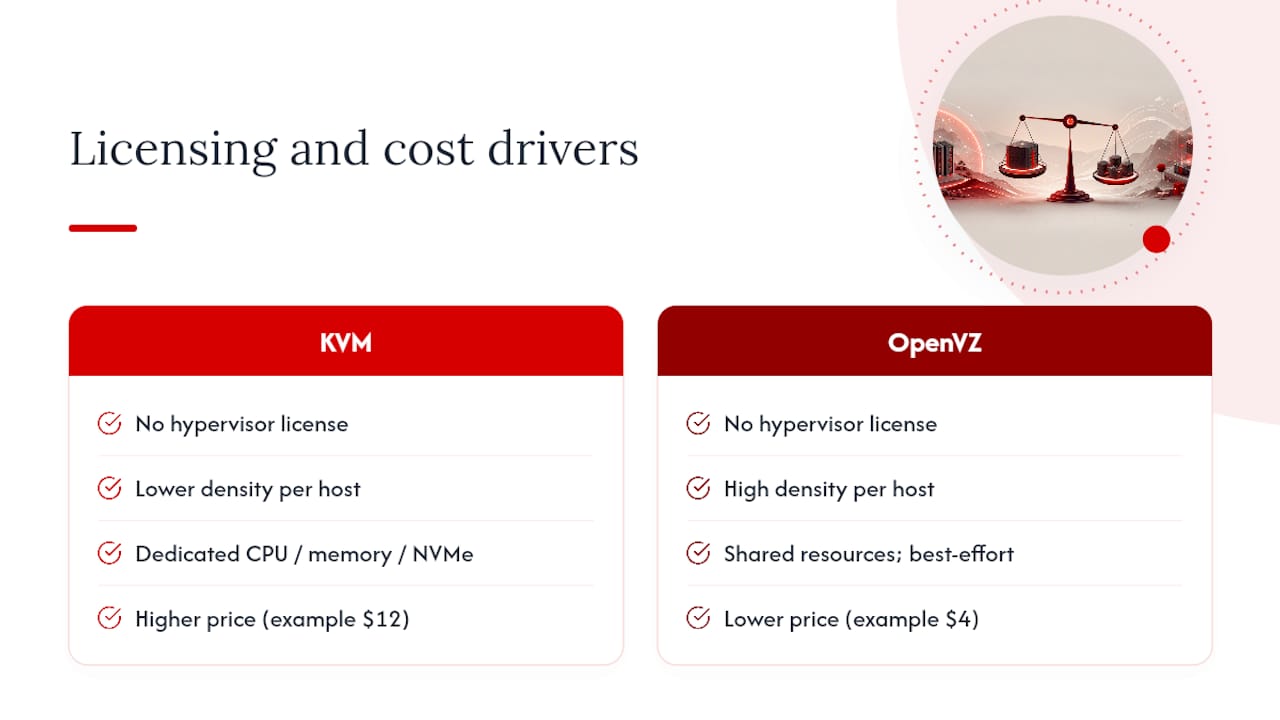
Neither KVM nor OpenVZ carries a licensing fee for the hypervisor technology itself. Both are open-source at their core, so the cost difference you see between plans has nothing to do with software licensing and everything to do with hardware economics.
OpenVZ is cheaper because providers can pack far more containers onto a single physical node than they could with full VMs, and that density gets passed through as a lower monthly price. You’re effectively renting a smaller, more crowded slice of shared infrastructure.
KVM plans cost more because each virtual machine reserves dedicated CPU cycles, memory, and often dedicated NVMe storage allocation rather than sharing a thinner pool with dozens of neighbors. That premium buys enforced resource guarantees rather than best-effort availability. When you’re comparing a $4 OpenVZ container to a $12 KVM instance, you’re not paying for different licenses. You’re paying for isolation, kernel control, and a resource commitment the provider actually has to honor.
How AceRDP Approaches KVM for Real Customer Workloads
AceRDP builds its VPS lineup around KVM specifically for customers needing isolation and kernel control. Plans include AMD Ryzen CPUs, NVMe storage, DDoS protection, and instant provisioning to ensure resource commitments are met.
That maps directly onto the decision checklist above: if your workload touches Docker, Windows RDP, compliance requirements, or anything performance-sensitive, KVM is the tier worth paying for. AceRDP’s plan tiers scale by CPU and RAM specifically so you’re not stuck rebuilding on a bigger platform later.
— AceRDP
Get a KVM VPS Built for What You’re Actually Running
If the checklist above pointed you toward KVM, you don’t need to piece together a hypervisor setup yourself. AceRDP runs its VPS lineup on KVM with AMD Ryzen CPUs, NVMe storage, and DDR5 RAM, offering isolation and kernel control as standard features.

That matters most if you’re running Docker, a Windows RDP setup, or any workload where a noisy neighbor on a shared kernel would actually cost you something. AceRDP plans provision instantly, include DDoS protection, and support flexible payment options, with server locations in multiple regions. If your current setup has you second-guessing whether your “guaranteed” resources are actually guaranteed, that’s usually a sign it’s time to move. Check the current KVM VPS plans and pick the tier that matches the CPU and RAM your workload actually needs.
Sources
- Linux-kvm
- Download
- LXC vs VM in Proxmox: When to Use Each — TechFuel HQ
- KVM vs OpenVZ: What the Virtualization Type Means for Your VPS - VPS Host Review
FAQ
What Are the Downsides of Using KVM?
KVM instances cost more than comparable OpenVZ containers because each VM reserves dedicated resources rather than sharing a thinner pool. KVM also carries slightly higher overhead from running a full guest kernel, which matters only for extremely resource-constrained micro workloads.
Is KVM Better Than Hyper-V?
KVM and Hyper-V are both full hardware virtualization platforms with similar isolation guarantees; KVM is Linux-native and dominates most VPS hosting environments, while Hyper-V is Microsoft’s platform built for Windows Server environments. Neither is universally “better,” but for Linux-based VPS hosting, KVM is the standard.
What Is the Best Virtual Manager for Linux?
For most Linux VPS environments, KVM paired with a management layer like Proxmox or libvirt is the standard choice because it gives you full kernel control and native Docker support. OpenVZ remains an option only for very low-cost, Linux-only, non-containerized workloads.
Are Proxmox and KVM the Same Thing?
No. KVM is the underlying virtualization technology built into the Linux kernel, while Proxmox is a management platform that runs on top of KVM (and also supports LXC containers) to provide a web interface for creating and managing VMs.
Does AceRDP Offer OpenVZ Plans?
AceRDP focuses on KVM VPS hosting rather than OpenVZ, emphasizing isolation, kernel control, and Docker compatibility suited for production, development, and remote desktop workloads.


