RDP vs VNC: Which Remote Desktop Protocol Wins?

RDP vs VNC: Which Remote Desktop Protocol Wins?
For Windows-first administration on tight bandwidth, RDP wins. For cross-platform screen sharing or letting multiple people watch one physical display, VNC wins. The difference comes down to architecture: RDP sends drawing instructions and caches what it can, while VNC ships raw pixel updates from a framebuffer. That gap in efficiency shapes almost everything else in the rdp vs vnc debate.
Both protocols carry real security risk if you expose them carelessly.
- RDP: Best for Windows servers, low bandwidth, single-user admin sessions
- VNC: Best for mixed OS environments, shared displays, watching a physical screen remotely
- Security minimum: Never expose either directly to the internet; tunnel through SSH, VPN, or a broker
Quick fact: RDP’s instruction-based drawing and client-side caching let it avoid retransmitting identical UI elements, which is why it holds up on connections VNC struggles with.
Key Takeaways
RDP’s instruction-based architecture and native TLS/NLA support make it the stronger default for Windows administration, while VNC remains the practical choice for cross-platform and shared-display work.
| Point | Details |
|---|---|
| RDP wins on bandwidth | Caching and instruction-based drawing let RDP stay usable well below 2 Mbps, where VNC often struggles. |
| VNC fits mixed environments | Cross-platform systems without native RDP, like many Linux boxes, rely on VNC or tools like xrdp. |
| RDP is safer by default | Native TLS encryption and NLA authenticate sessions before they start; standard VNC often lacks this. |
| Legacy VNC is a real risk | Some deployments store weak passwords or allow null authentication, a documented attack vector. |
| Never expose either directly | Tunnel through SSH, VPN, or a broker regardless of which protocol you choose. |
Table of Contents
- RDP vs VNC: How Each Protocol Moves Pixels to Your Screen
- How Do Bandwidth and Latency Compare in Practice?
- Which Protocol Is More Secure Out of the Box?
- When Should You Choose RDP Instead of VNC?
- What Do You Need to Deploy and Troubleshoot Either Protocol?
- Should You Self-Host or Use a Managed RDP/VPS Provider?
- What Sysadmins Get Wrong About Choosing Between RDP and VNC
- Frequently Asked Questions
- Sources
RDP vs VNC: How Each Protocol Moves Pixels to Your Screen
RDP and VNC solve the same problem with almost opposite philosophies. RDP is a remote presentation protocol: it sends drawing primitives (draw this rectangle, render this text, blit this bitmap) rather than a picture of the finished screen. VNC, built on the Remote Framebuffer protocol (RFB), captures whatever is on the server’s display and streams pixel differences to the client. One describes the scene; the other photographs it repeatedly.
That distinction drives three practical differences administrators run into daily:
- Session model. RDP typically spins up a virtual session tied to the user’s login, separate from the console display, which is why multiple RDP users can work independently on the same Windows Server. VNC usually mirrors an existing physical or virtual display, so what you see is what’s actually rendered on that machine, console included.
- Caching behavior. RDP caches bitmaps, glyphs, and fonts on the client, so a window that redraws the same toolbar or menu doesn’t need to resend that data. This caching is a major reason RDP consumes less bandwidth on repetitive interfaces like admin consoles and line-of-business apps. VNC has no equivalent concept; every screen region is just pixels, cached or not, depending on the client’s own frame buffer.
- Update detection. Older VNC servers poll the screen at intervals to detect changes, which burns server CPU even when nothing moves. Some variants, including TightVNC and UltraVNC, support a video hook driver that pushes event-driven updates instead of polling, cutting CPU overhead substantially when it’s available.
VNC compensates for its pixel-heavy design with encodings: raw (no compression, rarely used over a network), RRE and Hextile (basic run-length approaches), and Tight, which layers JPEG-style compression onto busy regions. Modern RDP counters with codec and transport upgrades, including H.264 video encoding and UDP transport for lossy connections, features that didn’t exist in early RDP versions and materially change how it behaves on real-world links.
The tradeoff in plain terms: RDP asks more of the server’s ability to describe what changed, but needs far less network capacity. VNC asks less of the rendering logic but pushes more raw data across the wire and typically taxes server CPU harder.
How Do Bandwidth and Latency Compare in Practice?
RDP wins the bandwidth fight decisively. Administrators consistently report that RDP stays usable on connections where VNC becomes painful or unresponsive, with observed performance gaps widening sharply below roughly 2 Mbps. That threshold matters if you manage servers over satellite links, congested VPNs, or international connections with variable latency.
The reason ties back to architecture. A static admin screen, an RDP session, and glyph caching mean almost nothing new gets transmitted after the initial paint. Scroll through a long log file or play a video inside a VNC session, though, and the framebuffer model has no shortcuts: every changed pixel region has to be re-encoded and sent, over and over, frame after frame.
- Static desktops, forms, and typical admin consoles: RDP and VNC both perform adequately
- Scrolling text, dragging windows, or video playback: RDP holds up; unoptimized VNC often stutters or lags visibly
- Multi-monitor setups: RDP handles resolution and monitor changes more gracefully than most stock VNC configurations
Modern RDP’s toolkit includes adaptive compression that adjusts quality based on available bandwidth, H.264 encoding for smoother video-like content, and UDP transport that tolerates packet loss better than a pure TCP stream. VNC’s main lever is switching to Tight encoding and dropping color depth from 24-bit to 16-bit or 8-bit, which cuts bandwidth noticeably at the cost of visible banding on gradients and photos.
Pro Tip: If you’re stuck running VNC over a slow link, drop the color depth before you touch anything else. Going from 24-bit to 8-bit color often cuts bandwidth more than switching encodings alone, and most admin work doesn’t need photographic color accuracy.
For anyone managing servers remotely on a regular basis, this is the single biggest practical reason RDP dominates Windows administration. VNC still has its place, but it’s rarely the bandwidth-constrained one.
Which Protocol Is More Secure Out of the Box?
RDP starts from a stronger security baseline. It natively supports TLS encryption for the transport layer and Network Level Authentication (NLA), which authenticates the user before the session even initializes, reducing exposure to unauthenticated session-negotiation attacks. Standard VNC implementations, by contrast, often transmit session data in plaintext unless you explicitly tunnel the connection or choose an encrypted variant.
The VNC ecosystem’s bigger problem is legacy deployments. Security researchers at Pen Test Partners have documented VNC servers exposed with weak or default stored passwords, and in some cases null authentication entirely, letting anyone connect and take control. These aren’t theoretical misconfigurations; they show up in internet scans regularly, often on industrial or embedded systems nobody remembered to lock down.
That doesn’t make RDP immune. National cybersecurity advisories, including guidance from CISA on remote services being targeted by threat actors, flag exposed RDP endpoints as a recurring target for automated brute-force campaigns. A well-configured protocol pointed straight at the open internet is still an open door.
Hardening steps that apply regardless of which protocol you run:
- Never expose RDP or VNC directly to the internet; put either behind a VPN, SSH tunnel, or brokered gateway
- Enable NLA and enforce TLS on every RDP listener you control
- Replace or tunnel any legacy VNC server that stores credentials in plaintext or allows null authentication
- Layer on multi-factor authentication wherever your access broker or gateway supports it
- Monitor failed authentication attempts and lock out or alert on repeated failures
- Patch both the OS and the remote access software on a fixed schedule, not an ad hoc one
Pro Tip: Treat “is it patched” as a bigger security question than “which protocol did we pick.” A current, tunneled VNC server behind strong auth beats an unpatched, internet-facing RDP box every time.
When Should You Choose RDP Instead of VNC?
Match the protocol to the job, not the other way around. RDP fits Windows Server administration, session isolation for multiple simultaneous users, and any scenario where bandwidth is limited or variable. VNC fits mixed-OS shops, Linux and macOS boxes without native RDP support, and situations where you specifically need to see the same physical display someone else is looking at, like a kiosk, a Raspberry Pi, or a lab machine.
- Choose RDP if your fleet is mostly Windows, you need per-user virtual sessions, or your connection is under 5 Mbps.
- Choose VNC if you’re managing Linux or embedded devices without native RDP support, or you need shared visibility into one live screen.
- Check licensing before assuming RDP is free everywhere; concurrent-session limits on Windows editions matter for multi-user setups.
- Consider a broker (cloud gateway or jump host) when you need centralized access control across a mixed protocol environment instead of managing tunnels per machine.
- Default to tunneling for VNC in every case; treat plaintext VNC as a temporary state, never a permanent configuration.
What Do You Need to Deploy and Troubleshoot Either Protocol?
RDP listens on TCP/UDP port 3389 by default; VNC typically uses 5900 and up, one port per display. Never leave either port open to the public internet, even behind a strong password.
- Tunnel RDP or VNC through SSH, WireGuard, or a dedicated remote access gateway instead of port-forwarding directly
- On RDP, test UDP transport where your network allows it; it tolerates packet loss better than TCP-only fallback
- Enable H.264 codec support on RDP for smoother video and animation-heavy workloads
- On VNC, install a video hook driver where the software supports it to cut server CPU load from polling
- If you see stutter or lag, check for packet loss first, then CPU saturation, then color depth or codec settings
Pro Tip: High latency and packet loss look identical to users but need different fixes. Run a simple ping and traceroute before touching encoding settings; you’ll save yourself an hour of tuning knobs that were never the problem.
Should You Self-Host or Use a Managed RDP/VPS Provider?
Self-hosting works until latency, provisioning delays, or DDoS exposure become your problem to solve alone. A managed Windows RDP and VPS platform running modern AMD Ryzen CPUs and NVMe storage removes that overhead.
- Choose hosted RDP when you need fast provisioning across multiple regions
- Prioritize providers offering NLA/TLS by default, DDoS protection, and restricted listening interfaces
- Look for role-based access controls and active monitoring built into the management portal
What Sysadmins Get Wrong About Choosing Between RDP and VNC
Most teams treat this as a permanent choice. It’s not. Windows-heavy shops should default to RDP; mixed environments need both, tunneled properly. The real risk was never the protocol, it was leaving either one exposed.
Frequently Asked Questions
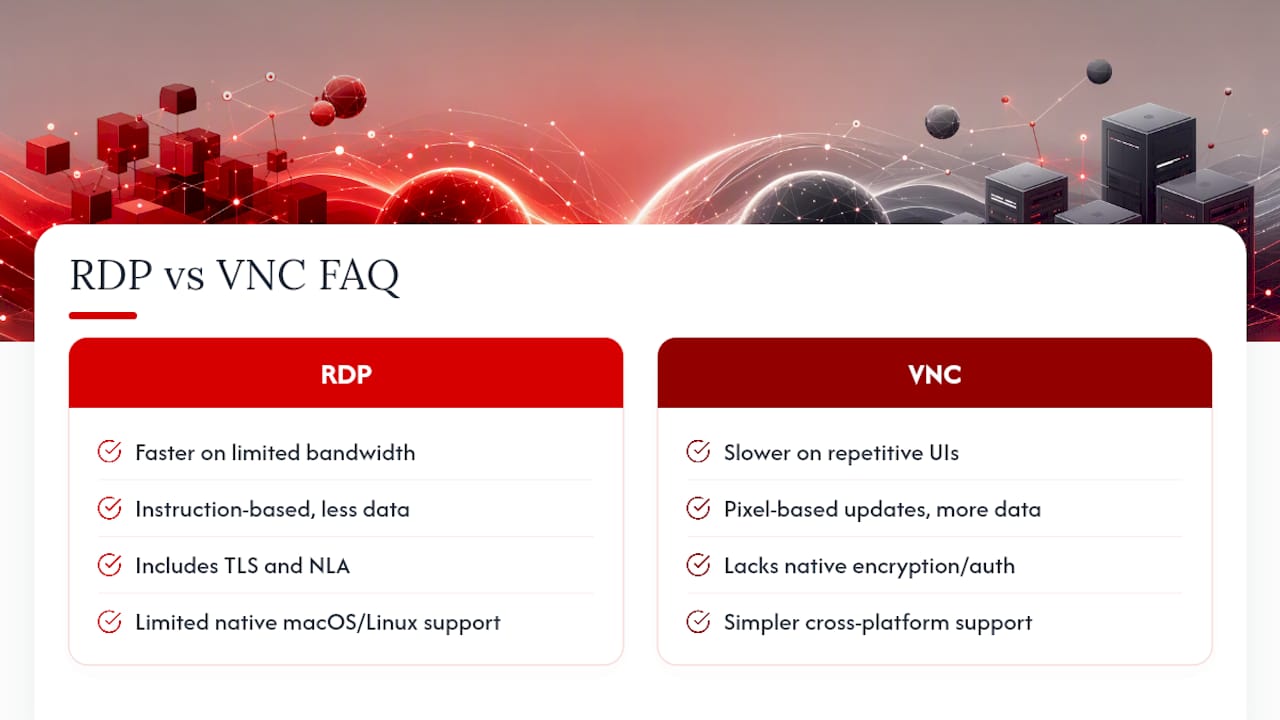
Is RDP faster than VNC? Generally yes, especially on limited bandwidth. RDP’s caching and instruction-based drawing mean less data travels the network compared to VNC’s pixel-based updates, particularly on repetitive interfaces like admin dashboards.
Is VNC less secure than RDP? Standard VNC lacks native encryption and strong authentication by default, while RDP includes TLS and NLA out of the box. Legacy VNC deployments carry documented risks around weak or null authentication, though either protocol becomes dangerous if exposed without tunneling.
Can I use RDP on Linux or macOS? Not natively in most cases, though tools like xrdp bring RDP support to Linux with extra configuration. VNC remains the simpler cross-platform option for heterogeneous environments.
Does RDP vs VNC performance change with modern updates? Yes. Newer RDP versions support H.264 codec encoding and UDP transport, improving performance on lossy or variable connections compared to older implementations, while optimized VNC variants with video hook drivers narrow the CPU gap somewhat.
Sources
- Comparative analysis of remote desktop protocol security (2026)
- Difference between RDP/Terminal Services and VNC streaming techniques (StackOverflow)


