2 Cores, 6 GB, 40 GB NVMe: Trading VPS Requirements to Verify
2 Cores, 6 GB, 40 GB NVMe: Trading VPS Requirements to Verify
Every trading VPS has to clear three bars: enough CPU and RAM for your workload, low latency to your broker or exchange, and reliability that keeps your strategy running when you’re not watching. For most retail algo traders, that means 2 vCPU, 4 GB RAM, and 60 GB of NVMe storage running Windows Server (or Linux if you’re not tied to MT4). Location beats horsepower almost every time.
TL;DR:
- The most critical factor for latency-sensitive trading is placing your VPS in a data center near your broker’s matching engine, ideally within the same facility.
- Single-instance retail trading typically requires 1 to 2 vCPU and 2 to 4 GB of RAM, but multi-strategy or heavy algorithmic setups need at least 4 to 8 vCPU and 16 GB of RAM.
- Verify provider claims by performing traceroute and ping tests over 24 to 48 hours, ensuring latency, jitter, and packet loss meet your strategy’s needs.
- For reliable operation, choose VPS providers with Tier 3 or Tier 4 data centers, that offer redundant network paths, daily backups, and tested restore procedures.
- Prioritize dedicated CPU cores and NVMe storage over raw specs, and treat provider claims as a starting point for thorough verification before selecting a VPS.
Table of Contents
- What Does a Trading VPS Actually Do?
- CPU and Memory: Sizing Guidance by Trading Workload
- Why Does Network Latency Depend on VPS Location?
- Windows or Linux: Which OS Fits Your Platform?
- How Much Uptime Should You Actually Expect?
- Storage and Bandwidth: What Actually Matters
- Securing Your VPS, API Keys, and RDP Access
- What Should You Actually Pay for Trading VPS Hosting?
- Setting Up and Monitoring Your Trading VPS
- AceRDP and the Trading VPS Checklist
- Why Most Traders Get VPS Selection Backwards
- Get Set Up on a Trading-Ready VPS
- Sources
- FAQ
What Does a Trading VPS Actually Do?
A trading VPS is a remote server that keeps your platform, whether it’s MetaTrader 4, MetaTrader 5, or a custom Python script hitting a broker API, running continuously on infrastructure that isn’t your laptop. It solves three problems your home internet connection cannot: it stays online when your power or Wi-Fi doesn’t, it sits physically closer to your broker’s servers than your house does, and it runs in an environment you can monitor and restart without touching your personal machine.
Who actually needs one depends on how your strategy behaves:
- Expert Advisor (EA) users and scalpers, where a few seconds of downtime can mean a missed exit or a runaway position
- Signal-following systems and webhook-driven strategies that need to stay reachable around the clock
- Anyone running Python, IB Gateway, or FIX-based algos that require persistent processes
- Manual swing traders who check in a few times a day, who often don’t need one at all
Many brokers offer a free VPS if you maintain a minimum trade volume or account balance. That’s fine for light EA use, but read the fine print. Free broker VPS instances are often shared, underpowered, and tied to that one broker, which becomes a problem the moment you want to run a second account or a different platform.
CPU and Memory: Sizing Guidance by Trading Workload
Your CPU and RAM needs scale directly with how many instances you run and how much data they chew through. A single MT4 terminal barely taxes a modern processor. A dozen EAs across five pairs with tick-level logging is a different animal entirely.
Here’s a practical breakdown by workload:
- Single MT4 or MT5 terminal: 1 to 2 vCPU, 2 to 4 GB RAM covers most retail setups, matching the minimum specs MT4 VPS guidance recommends for a single instance.
- Multi-instance trading (multiple terminals or brokers): 4 vCPU, 8 GB RAM, which lines up with what most forex VPS hosting guides recommend once you scale past one platform.
- Python or IB Gateway heavy algos: 4 to 8 vCPU, 16 GB RAM, more if you’re pulling and processing large historical datasets in memory.
- Institutional or multi-strategy desks running several accounts in parallel: 8+ vCPU, 32 GB RAM, often paired with dedicated (not shared) cores.
The number on your invoice isn’t always the number you get. Budget VPS plans frequently oversell CPU cores across many tenants, a practice called oversubscription. The symptom is “CPU steal”: your terminal freezes intermittently even though your own usage graph looks calm. Ask your provider directly whether cores are dedicated or shared, and whether they enforce a hard vCPU ceiling per tenant.
Pro Tip: *Run Windows Task Manager’s performance tab during your busiest trading hour for a week.
Why Does Network Latency Depend on VPS Location?
Location matters more than clock speed. Move your VPS from a home connection to a facility colocated with your broker’s matching engine and latency can drop substantially, often from tens or hundreds of milliseconds down to under 5 milliseconds, as reported in various trading hosting resources including BrokerAnalysis’s setup guide. That gap is the difference between a scalping strategy that works on paper and one that bleeds slippage in live conditions.
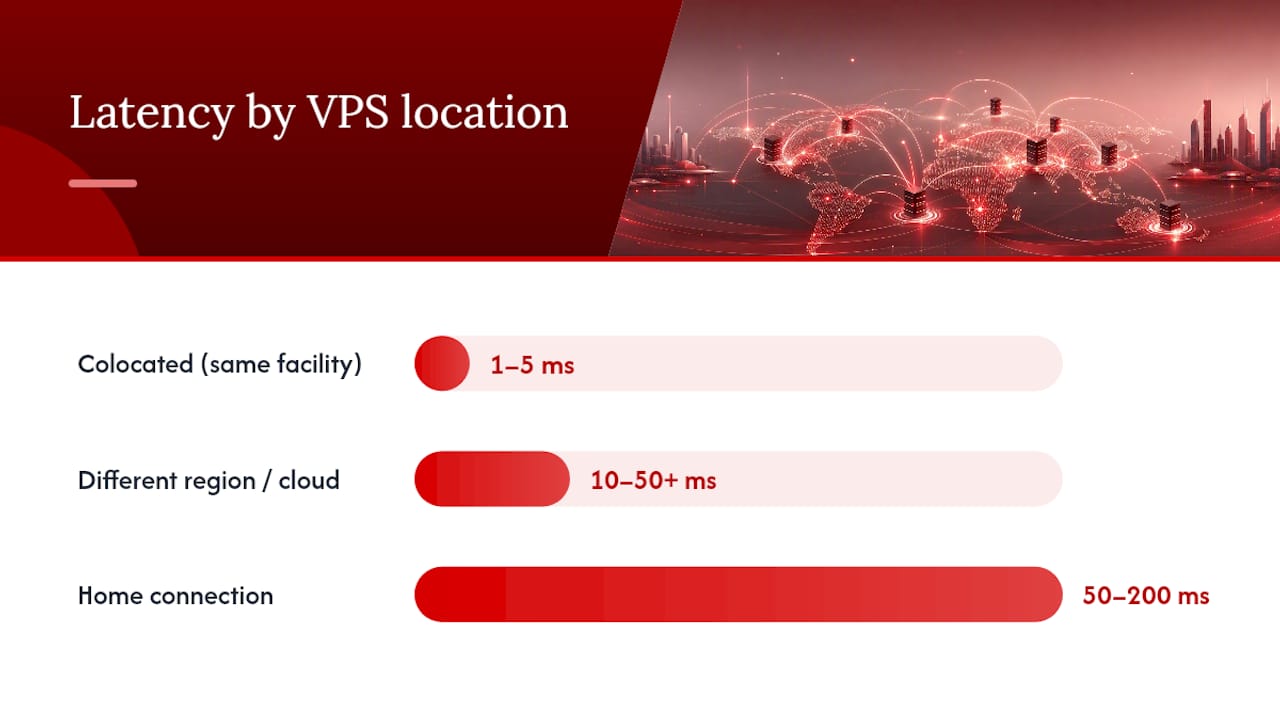
The physical hubs that matter most for trading are well known: Equinix LD4 in London, Equinix NY4 in New York, and Equinix TY3 in Tokyo host a large share of broker and exchange infrastructure. CME Group, for example, publishes exchange contract specifications tied to specific data-center locations, which is exactly the kind of detail you should match your VPS placement against.
There’s a real gap between same-facility connections and everything else. A cross-connect inside the same building as your broker’s servers typically runs under 1 to 5 milliseconds. A VPS in a different region, or on general-purpose cloud infrastructure, often lands in the 10 to 50+ millisecond range, fine for swing trading, risky for scalping.
Don’t take a provider’s latency claim at face value. Verify it yourself:
- Ask the provider for a traceroute to your specific broker’s server IP before you sign up.
- Run
pingandmtr(orpathpingon Windows) for at least 24 hours to catch time-of-day variation. - Check jitter and packet loss, not just average latency; a stable 15ms beats an erratic 8ms that spikes to 40ms under load.
If your strategy relies on TradingView webhooks or third-party signal delivery, latency isn’t the whole story. TradingView’s own webhook documentation notes that delivery depends on stable outbound connectivity, so a VPS with perfect inbound latency to your broker but flaky DNS resolution can still cost you fills.
Windows or Linux: Which OS Fits Your Platform?
MetaTrader 4 and MetaTrader 5 are Windows-native applications, so Windows Server is the default choice for anyone running EAs on either platform. You can run MT4 on Linux through Wine, but expect occasional rendering glitches and plugin compatibility issues that make it a workaround, not a first choice.
Linux pulls ahead when your strategy lives outside MetaTrader entirely, think Python scripts, FIX API connections, or REST-based bots. It uses less RAM for the same workload and scripts more naturally for automation and cron-based monitoring.
A few configuration details matter regardless of which OS you pick:
- Disable automatic Windows updates and reboots during your trading hours; an unscheduled restart mid session is how EAs miss trades.
- Require administrative access so you can configure snapshots and backups yourself, not just request them from support.
- On Linux, set up a process manager (like
systemdorsupervisor) so a crashed script restarts automatically instead of sitting dead until you notice.
How Much Uptime Should You Actually Expect?
For anyone running unattended EAs, that difference is the gap between “acceptable” and “how did I miss that gap-up move.”
Uptime Institute’s tier standard is the closest thing the industry has to a common language for data-center reliability. Tier 1 and Tier 2 facilities have limited redundancy and planned downtime for maintenance. Tier 3 facilities can perform maintenance without taking systems offline. Tier 4 adds full fault tolerance across power and cooling. For anything beyond casual manual trading, aim for a provider running on Tier 3 or Tier 4 infrastructure.
Beyond the tier label, ask providers to confirm a specific set of practices:
- Redundant network paths, not a single upstream connection that becomes your single point of failure
- Daily automated snapshots, retained for at least a week
- Actual restore testing, not just backup creation, since an untested backup is a hope, not a plan
- Proactive uptime and resource monitoring with alerts, not a dashboard you have to check manually
Pro Tip: Ask a prospective provider one specific question: “When did you last perform a full restore test from a snapshot, and how long did it take?” A confident, specific answer tells you more than any SLA percentage on their pricing page.
Storage and Bandwidth: What Actually Matters
NVMe or SSD storage isn’t optional at this point; a spinning hard drive introduces I/O latency that shows up as delayed order execution and laggy chart rendering, full stop. A single MT4 or MT5 instance runs comfortably on 40 to 60 GB. Heavier setups running multiple platforms, tick-level logging, or backtest archives should plan for 120 GB or more.
Log-heavy EAs and frequent backtesting generate a surprising amount of write activity over time, so filesystem performance matters as much as raw capacity. On the network side, stop thinking in terms of advertised port speed. What you want is consistent throughput and near-zero jitter, not a big number on a spec sheet.
Securing Your VPS, API Keys, and RDP Access
The most common way traders lose money to a compromised VPS isn’t a sophisticated attack. It’s a leaked API key with permissions it never needed. Apply the principle of least privilege to every credential: your trading API key should have trade and read access only, and withdrawal permissions should never be enabled on a key that lives on a server, period.
On the access side:
- Change the default RDP port and enable two-factor authentication wherever your provider supports it.
- Rotate RDP and platform credentials on a regular schedule, and store them in a password vault instead of a text file on the desktop.
- Restrict RDP access by IP address if your provider allows it, so only your known locations can even attempt a login.
- Confirm the provider handles DDoS mitigation and network segmentation at the infrastructure level; that’s protection you can’t configure yourself.
The CFTC’s guidance on technology innovation treats operational resilience, including how firms secure and back up trading infrastructure, as a core part of running automated systems responsibly. Retail traders running EAs unattended are operating under the same basic logic, just at a smaller scale.
What Should You Actually Pay for Trading VPS Hosting?
Price bands in this space split roughly three ways, and picking the wrong one usually means either overpaying for headroom you don’t need or getting burned by limits you didn’t know existed.
- Free broker VPS: Usually conditional on trade volume or account balance. Fine for a single EA on one broker, risky if you want platform independence.
- Budget independent VPS ($10 to $50/month): Covers single to multi-instance MT4/MT5 setups with decent specs, assuming you’ve verified the location and CPU allocation yourself.
- Premium or colocated hosting ($50 to $150+/month): Built for latency-sensitive scalping, multi-broker setups, or heavier algo workloads that need dedicated cores and premium data-center placement.
Free broker VPS comes with a quiet trade-off worth naming directly: you’re often locked into that broker, and some brokers reserve the right to pull VPS access if you reduce trading volume or attempt a withdrawal that shrinks your qualifying balance below the threshold. Independent paid hosting costs money but gives you control over location, specs, and which broker (or brokers) you connect to. Choose based on how latency-sensitive your strategy actually is; a swing trader checking positions twice a day doesn’t need the same setup as a five-second scalper.
Setting Up and Monitoring Your Trading VPS
Provisioning a VPS is the easy part. Keeping it reliable over months of live trading is where most traders drop the ball. Here’s the order that actually works:
- Verify location before you configure anything. Run a traceroute and ping test to your broker’s server IP the day you get access, and confirm the facility matches what was advertised.
- Measure latency and jitter for at least 24 to 48 hours across different times of day, since congestion patterns shift between market sessions.
- Disable automatic reboots and Windows updates so a patch cycle doesn’t restart your terminal mid trade.
- Set up daily automated snapshots and confirm you (not just support) can trigger a restore.
- Install a process watchdog or auto-restart tool for any bot or script so a crash doesn’t mean silent downtime until you happen to check.
- Configure uptime and resource alerts for CPU, RAM, and connectivity, sent to your phone or email, not just a dashboard you might forget to open.
- Run a weekly restore test on a non-production snapshot to confirm your backup actually works, not just that it exists.
- Schedule maintenance windows outside market hours for anything that requires downtime, and log every change so you can trace a problem back to its cause.
Pro Tip: Set a recurring calendar reminder for the restore test. It’s the single most skipped step on this list, and it’s the one that matters most the day something actually breaks.
AceRDP and the Trading VPS Checklist
Everything above points to a specific set of requirements: dedicated CPU headroom, fast storage, low-latency locations, and infrastructure you can actually verify rather than take on faith. AceRDP offers AMD Ryzen processors and NVMe storage across plans to provide strong performance suitable for MT4 and MT5 terminals.
For sizing against the workloads covered earlier, AceRDP’s plan lineup scales in a way that roughly tracks trader needs: entry tiers like Bronze and Silver suit a single MT4/MT5 terminal, mid-range plans like Platinum and Titanium fit multi-instance setups running several EAs or brokers, and the higher tiers work for heavier Python or multi-account algo environments. The automated portal allows quick instance provisioning, and the service includes infrastructure-level DDoS protection for security.
None of that replaces doing your own verification. Run the traceroute test. Check the restore process. Confirm the specs against your actual workload before you commit.
Why Most Traders Get VPS Selection Backwards
Most guides to trading VPS selection lead with CPU cores and RAM, because those numbers are easy to compare and easy to sell against. That’s backwards. A trader running a single MT4 EA on a 4 vCPU box three time zones from their broker is worse off than one running the same EA on 2 vCPU sitting in the right facility. The industry’s own numbers back this up: colocated latency running under 5 milliseconds versus 50 to 200 milliseconds from a typical home connection isn’t a marginal improvement, it’s a different category of execution risk.
The second thing traders underestimate is how much operational discipline matters compared to raw specs. Downtime doesn’t announce itself in advance, and the trader who finds out their snapshot never actually worked is finding out at the worst possible moment.
If there’s one habit worth building from this article, it’s treating your VPS provider’s claims as a starting point for verification, not a conclusion. Ask for the traceroute. Ask when they last tested a restore. Ask whether cores are dedicated. The providers worth paying for will answer specifically. The ones that don’t are telling you something too.
— AceRDP
Get Set Up on a Trading-Ready VPS
If your strategy depends on consistent execution, the setup that gets you there is a VPS built with dedicated resources rather than oversold capacity. AceRDP runs on AMD Ryzen infrastructure with NVMe storage on every plan, giving MT4, MT5, and custom algo setups the CPU headroom and disk speed this guide flags as non-optional, paired with DDoS protection and an automated portal that provisions a new server in minutes instead of days.

Whether you’re running a single EA or scaling into multi-instance and multi-broker setups, the plan lineup at AceRDP covers that range, from the Bronze tier at 12 EUR per month for lighter single-terminal use up through Titanium at 60 EUR per month and Legend at 80 EUR per month for heavier algo workloads. Pricing for the Gold, Diamond, and Obsidian tiers is available directly on the site. Pick the tier that matches your current workload, and use the checklist from this guide to verify latency to your broker before you commit a single trade to it.
Sources
- VPS for Forex Trading: Complete Setup Guide — BrokerAnalysis
- Uptime Institute — Tier Standard
- TradingView — About webhooks
FAQ
Which VPS Is Best for Trading?
The best trading VPS is the one located closest to your broker’s or exchange’s matching engine, running dedicated (not oversold) CPU cores with NVMe storage and at least a 99.9% uptime SLA. For MT4/MT5 users specifically, that generally means a Windows Server instance with 2 to 4 vCPU and 4 to 8 GB RAM as a solid starting point.
How Much Does a VPS Cost for Trading?
Independent trading VPS hosting typically runs $10 to $50 per month for budget to mid-range setups, and $50 to $150 or more for premium or colocated hosting built for latency-sensitive strategies. AceRDP’s published plans range from 12 EUR per month (Bronze) up to 80 EUR per month (Legend), with several mid-tier plans priced on the AceRDP site.
What Is the Best VPS Server for Trading?
There’s no single “best” server spec since it depends on your platform and strategy, but the consistent pattern across trading VPS requirements is dedicated CPU cores, NVMe storage, and a data center located near your broker’s servers, in hubs like Equinix LD4 or NY4. Match those three factors to your workload before comparing raw CPU or RAM numbers.
What Is the Best VPS for Trading Futures?
Futures traders should prioritize proximity to the specific exchange’s matching engine, since CME Group and other exchanges publish contract specifications tied to particular data-center locations. Beyond location, the same baseline applies: dedicated vCPU allocation, NVMe storage, and a provider that can confirm Tier 3 or Tier 4 data-center infrastructure.